Showing posts with label gionee. Show all posts
Showing posts with label gionee. Show all posts
Saturday, July 23, 2016
How To Flash CMW Recovery On Gionee P2

If you’ve ever thought about messing with your Android device, you’ve probably read that you need to flash a custom recovery onto it before you can do anything serious. But, you might want to ask a few questions like — what’s a recovery? What’s a custom recovery? What are my options for custom recoveries? We’re going to take a complete look at recoveries so that you can be well-informed when you start messing with your Android device.
What’s a Recovery?
The recovery, simply put, is a runtime environment (think “mini operating system”) separate from Android that can perform various system-related tasks. The stock recovery on most Android devices can apply OTA (over-the-air) updates, delete user and cache content (for factory reset purposes), and allow external tools from a microSD card to run functions on the device.
Compared to a full-sized PC, it is most similar to the BIOS in that it is a small piece of software that is independent of the operating system and can control various system settings and functions, but it does not actually perform the same exact tasks. For example, the recovery doesn’t control any I/O functions, which is entirely what the BIOS is about. The recovery also has no power as soon as Android is being loaded.
And a Custom Recovery?

A custom recovery is a non-stock recovery, which people can install over the stock recovery. There are many different reasons why someone will want to install a custom recovery — most of those reasons are extra functionality. Most of the major features include:
- The ability for third-party ROMs to be installed over the stock Android image
- The ability to perform Nandroid backups — these are very good backups that saves literally everything from your personal data to the operating system itself
- The ability to communicate with the Android Debug Bridge, or adb, on a computer for debugging and other developer-type actions, which is otherwise only possible when enabling developer tools within Android
- A more useful and/or visually-pleasing interface for the recovery, which can include touch capabilities or an interface not driven by menu options.
#CMW Recovery for Gionee P2.....Download it here
After you download it put it on root of sdcard.
Install Mobileuncle MTK Tools from link here:
https://play.google.com/store/apps/details?id=com.mobileuncle.toolbox
Enter into MobileUncle Tools and Click on “Recovery update“.
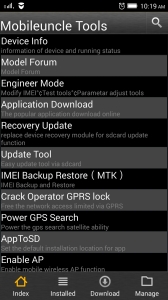
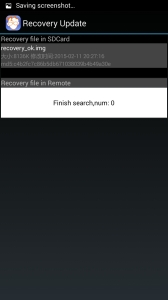
Now choose recovery image you download earlier (in this case recovery_ok.img, use either CWM or TWRP).
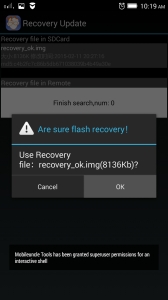
Choose OK after dialog “Are sure flash recovery!”.
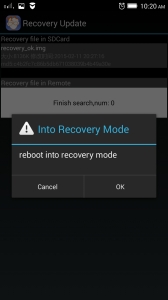
Reboot directly into recovery if you wish.
That’s all!
If you want to enter recovery from power off do this:
- Turn off the phone, uncheck quick boot mode.
- Press Volume +, Volume – and Power, all three at the same time and hold them until you see recovery screen.


Thursday, July 21, 2016
Gionee G5 Firmware Flash File Download

***Some FAQ about flash and flashing of Gionee G5 flash file ***
Ques- What does your Flashing Gionee G5 means ?
Ans- The meaning Of Flashing is "To reinstalling the operating system(OS) of the cell phone" in this process, "A new operating system stock rom is installed in place of old operating system" this is the condition of downloading a sole into a mobile phone.
(All the data is hosted by welcome zone haldwani only)***POINTS TO REMEMBER WHILE FLASHING***
- A Flashing does erase all of your stored personal data like Contacts, Pics, text, etc .
- Also remove the Micro SD card and Sim card .
- Charge your Gionee G5 battery upto minimum 60%-80%.
(Before flashing it is better to reset your phone by clicking in the setting option if it is possible)
Gionee G5 Flash File firmware Download
ALL TOOLS AND ORIGINAL FLASH FILES LINK GIVEN BELOWFirmware Download
Version:1 Gionee_G5_0101_T6053_
Version:2 Gionee_G5_0101_T6064_
| Gionee G5 | flash tool | Download |
| Gionee G5 | usb drivers | Download |
How To Flash Click Here See instructions
How To Repair IMEI Click Here See instructions
How To Repair IMEI Click Here See instructions
PASSWORD FOR OPEN THE WINRAR FILE => androidflashfile.com |
Ques- when will you need to install the operating system software in your phone ?
Ans- Flashing required when Gionee G5 operating system gets corrupted , dead or it shows some problems like :-
- Phone functioning very slow.
- Restart automatically.
- Display not working well.
- When opening camera suddenly an error occurred and camera stopped working.
- some application is stopped working.
- booting problem occurs
- Virus problem
- network problem.
(All the data is hosted by welcome zone haldwani only)
we are trying to give our best but use this at your own risk , we dont responsible if there will be something get wrong with you .
Subscribe to:
Posts (Atom)