Showing posts with label firmware. Show all posts
Showing posts with label firmware. Show all posts
Friday, July 29, 2016
Cherry Mobile FlareXL Factory Firmware

How to flash this rom using sp flash tool, sorry we didnt teach or post any tutorial here this blog exclusively for the people having a experience on smartphone flashing a mobile tech as well. if you dont know how you doing much better stay away. or you wanna try or explore from it read first here our DISCLAIMER.
Factory Firmware Code:
MT6592__CherryMobile__X340__FlareXL__4.4.4__FlareXL_X340_V07_20150326
Download Cherry Mobile FlareXL Factory Rom
Download Flasher

Download Android ICS 4 0 4 stock firmware for ZTE U807 Smartphone

Download Android ICS stock firmware for ZTE U807 Smartphone from here or from here. Download previous firmware from here. Download another ZTE firmware from here.
Firmware details
Archives? ZTE_U807_4.0.4_20160302
Image: ZTE_U807_SJJL_ROM_20160302D
Archives? ZTE_U807_4.0.4_20160302
Image: ZTE_U807_SJJL_ROM_20160302D
Model? ZTE U807 Smartphone
Image file size: 175 MB
Platform: Mediatek MT6517A
Build number: P117A11-user 4.0.4 IMM76D eng.root.20130418.143716 release-keys
Caution: Please do not update firmware unless you know what you are doing, you really want it or it is absolutely necessary. Firmware updates may occasionally have bad results, like bricking your device, temporarily or permanently. The firmware update process is done entirely at your own risk. Before attempting to update the firmware, back up your data.
Don’t miss any of our future video tutorials, follow us on Youtube. Like us on Facebook. Add us in your circles on Google+. Watch our photo albums on Flickr. Subscribe now to our newsletter.
Build number: P117A11-user 4.0.4 IMM76D eng.root.20130418.143716 release-keys
Caution: Please do not update firmware unless you know what you are doing, you really want it or it is absolutely necessary. Firmware updates may occasionally have bad results, like bricking your device, temporarily or permanently. The firmware update process is done entirely at your own risk. Before attempting to update the firmware, back up your data.
Don’t miss any of our future video tutorials, follow us on Youtube. Like us on Facebook. Add us in your circles on Google+. Watch our photo albums on Flickr. Subscribe now to our newsletter.
Download latest Android Lollipop 5 1 1 stock firmware for Ugoos UM3 TV Box

Download latest Android Lollipop 5.1.1 stock firmware for Ugoos UM3 TV Box from here, here or from here. Download previous firmware from here.
Glad to announce to you what now you can try our new firmware based on Android 5.1. We would appreciate if you tell us about the bugs that you find in the firmware. Also, we will be happy to hear your suggestions for modifying the firmware, which you think would be helpful. Together we can make our devices more usefull for us.
Glad to announce to you what now you can try our new firmware based on Android 5.1. We would appreciate if you tell us about the bugs that you find in the firmware. Also, we will be happy to hear your suggestions for modifying the firmware, which you think would be helpful. Together we can make our devices more usefull for us.
Firmware details
Archive? UM3_3.0 .6
Image: um3_3.0.6.img
FW version: 5.0.00
Archive? UM3_3.0 .6
Image: um3_3.0.6.img
Model: Ugoos UM3 TV Box
Firmware: Android Lollipop 5.1.1 stock
Archive size: 463 MB
Build number: UT3S-userdebug 5.1.1 LMY48G eng.avagetto.20160523.084714 release-keys
SDK version: RK30_ANDROID5.1.1-SDK-v1.00.00
Platform: Rockchip RK3288Firmware: Android Lollipop 5.1.1 stock
Archive size: 463 MB
Build number: UT3S-userdebug 5.1.1 LMY48G eng.avagetto.20160523.084714 release-keys
SDK version: RK30_ANDROID5.1.1-SDK-v1.00.00
FW version: 5.0.00
Boot version: 2.19
Model number: UGOOS-UT3S
Inside archive: firmware + DriverAssitant_v4.3 + AndroidTool v2.3 + ugoos_firmware_upgrade_guide
How to flash this firmware
1. If it first time, you need to install drivers use DriverAssitant or manual when connecting device
2. Run AndroidTool.exe
3. Switch to "Upgrade Firmware" tab
4. Press button "Firmware" and select update image (Example: "ut3_3.0.6.img")
5. Connect device to PC via USB OTG port (full guide by connecting you can find in "ugoos_firmware_upgrade_guide")
6. Press "Upgrade" button
Main changes of version 3.0.6 (23/05/2016) from previous version:
1. Fixed bugs with usb-card mount/unmount.
2. Added exfat support
3. Added Gamepad settings and axes simulation
4. Added TvSettings
5. Replaced Rockchip Filemanager, added Ugoos Filemanager
6. Changed processing logic of Daydream (Screensaver) and Sleep timers.
7. Fixed bug with wakeup after sleep. Now device is not going to the suspend mode
8. Added Cast Receiver app. You can share video to the box from YouTube app on your mobile phone
9. Improved Hardware monitor:
- Added icons
- added Network activity
- added CPU load activity
10. Added screen rotation support
11. Fixed time zone for multi-window mode
12. Updated UgoosLauncher
We already announce some details about the most important improvements and changes:
- Gamepad settings – let you customize your gamepad control settings
- Ugoos File Manager – our new step for making Ugoos TV Boxes more convenient for remote controllers.
- TV Settings - application developed by Google special for Android TV
However, this is not all the news:
Daydream and Sleep Logic. Now we separate setting timer for screensaver and for sleep features. You can set only daydream or sleep or both and set appropriate time. Also you can start it from menu via choosing special menu item. Run Daydream: Settings – Display - Daydream.
TV Settings. We created new icons for TV settings menu in order to reach all Ugoos settings quicker. For most frequent-using Ugoos settings, we redraw pages according to TV settings menu style.
Exfat support. Many users asked about this feature for android 5.1, because it was very useful in 4.4-based firmwares. Now you can use attached hard drives and usb flash drives in exfat file system, share files using built-in Ugoos File server and perform other related tasks.
Screen rotation. Screen rotation feature let use TV Box for a wider amount of non-casual tasks. It becomes more convenient for displaying different types of information. New function let you choose screen positions with five different settings. Forced orientation for all applications added for both vertical (portrait) and horizontal types. Run screen rotation: Settings – Display – Screen rotation
Gamepad settings. We already share details about this new Ugoos feature. In addition, we add one more setting little bit later and didn’t announce about it before. Now you get an ability to simulate axes moves using keyboard. Now you can choose a keyboard in device profile and appoint moves on the buttons you used to for particular gaming experience. Run Gamepad settings: Settings – Ugoos settings – System – Gamepad Settings.
Hardware Monitor. We added new icons with activity visualization, so now you can choose if you want to display only icons or icons and text values also. Added network activity and CPU load activity. Run Hardware Monitor: Settings – Ugoos Settings - System – HW Monitor.


Caution: Please do not update firmware unless you know what you are doing, you really want it or it is absolutely necessary. Firmware updates may occasionally have bad results, like bricking your device, temporarily or permanently. The firmware update process is done entirely at your own risk. Before attempting to update the firmware, back up your data.
Don’t miss any of our future video tutorials, follow us on Youtube. Like us on Facebook. Add us in your circles on Google+. Watch our photo albums on Flickr. Subscribe now to our newsletter.
Model number: UGOOS-UT3S
Inside archive: firmware + DriverAssitant_v4.3 + AndroidTool v2.3 + ugoos_firmware_upgrade_guide
How to flash this firmware
1. If it first time, you need to install drivers use DriverAssitant or manual when connecting device
2. Run AndroidTool.exe
3. Switch to "Upgrade Firmware" tab
4. Press button "Firmware" and select update image (Example: "ut3_3.0.6.img")
5. Connect device to PC via USB OTG port (full guide by connecting you can find in "ugoos_firmware_upgrade_guide")
6. Press "Upgrade" button
Main changes of version 3.0.6 (23/05/2016) from previous version:
1. Fixed bugs with usb-card mount/unmount.
2. Added exfat support
3. Added Gamepad settings and axes simulation
4. Added TvSettings
5. Replaced Rockchip Filemanager, added Ugoos Filemanager
6. Changed processing logic of Daydream (Screensaver) and Sleep timers.
7. Fixed bug with wakeup after sleep. Now device is not going to the suspend mode
8. Added Cast Receiver app. You can share video to the box from YouTube app on your mobile phone
9. Improved Hardware monitor:
- Added icons
- added Network activity
- added CPU load activity
10. Added screen rotation support
11. Fixed time zone for multi-window mode
12. Updated UgoosLauncher
We already announce some details about the most important improvements and changes:
- Gamepad settings – let you customize your gamepad control settings
- Ugoos File Manager – our new step for making Ugoos TV Boxes more convenient for remote controllers.
- TV Settings - application developed by Google special for Android TV
However, this is not all the news:
Daydream and Sleep Logic. Now we separate setting timer for screensaver and for sleep features. You can set only daydream or sleep or both and set appropriate time. Also you can start it from menu via choosing special menu item. Run Daydream: Settings – Display - Daydream.
TV Settings. We created new icons for TV settings menu in order to reach all Ugoos settings quicker. For most frequent-using Ugoos settings, we redraw pages according to TV settings menu style.
Exfat support. Many users asked about this feature for android 5.1, because it was very useful in 4.4-based firmwares. Now you can use attached hard drives and usb flash drives in exfat file system, share files using built-in Ugoos File server and perform other related tasks.
Screen rotation. Screen rotation feature let use TV Box for a wider amount of non-casual tasks. It becomes more convenient for displaying different types of information. New function let you choose screen positions with five different settings. Forced orientation for all applications added for both vertical (portrait) and horizontal types. Run screen rotation: Settings – Display – Screen rotation
Gamepad settings. We already share details about this new Ugoos feature. In addition, we add one more setting little bit later and didn’t announce about it before. Now you get an ability to simulate axes moves using keyboard. Now you can choose a keyboard in device profile and appoint moves on the buttons you used to for particular gaming experience. Run Gamepad settings: Settings – Ugoos settings – System – Gamepad Settings.
Hardware Monitor. We added new icons with activity visualization, so now you can choose if you want to display only icons or icons and text values also. Added network activity and CPU load activity. Run Hardware Monitor: Settings – Ugoos Settings - System – HW Monitor.
Caution: Please do not update firmware unless you know what you are doing, you really want it or it is absolutely necessary. Firmware updates may occasionally have bad results, like bricking your device, temporarily or permanently. The firmware update process is done entirely at your own risk. Before attempting to update the firmware, back up your data.
Don’t miss any of our future video tutorials, follow us on Youtube. Like us on Facebook. Add us in your circles on Google+. Watch our photo albums on Flickr. Subscribe now to our newsletter.
Download latest Android Lollipop 5 1 stock firmware for HomTom HT7 smartphone

Download latest Android Lollipop 5.1 stock firmware for HomTom HT7 smartphone from here, here or from here. Download OTA update firmware from here (59 MB). Download another HomTom firmware from here.
Firmware details
Archive? HOMTOM HT7 Android 5.1 1GB 8GB MTK6580A Smartphone Firmware
Firmware: Android Lollipop 5.1 stock
Project: br6580_weg_l
Firmware details
Archive? HOMTOM HT7 Android 5.1 1GB 8GB MTK6580A Smartphone Firmware
Firmware: Android Lollipop 5.1 stock
Model: HomTom HT7 smartphone
Image file size: 537 MB
Platform: Mediatek MT6580Image file size: 537 MB
Project: br6580_weg_l
Config_version: V1.1.2
BPLGUInfoCustomAppSrcP_MT6580_S00_MOLY_WR8_W1449_MD_WG_MP_V23_1_wg_n
Inside archive: firmware + SP_Flash_Tool_exe_Windows_v5.1520.00.000
BPLGUInfoCustomAppSrcP_MT6580_S00_MOLY_WR8_W1449_MD_WG_MP_V23_1_wg_n
Inside archive: firmware + SP_Flash_Tool_exe_Windows_v5.1520.00.000
Caution: Please do not update firmware unless you know what you are doing, you really want it or it is absolutely necessary. Firmware updates may occasionally have bad results, like bricking your device, temporarily or permanently. The firmware update process is done entirely at your own risk. Before attempting to update the firmware, back up your data.
Don’t miss any of our future video tutorials, follow us on Youtube. Like us on Facebook. Add us in your circles on Google+. Watch our photo albums on Flickr. Subscribe now to our newsletter. Biggest firmware download center.
Download latest Android KitKat 4 4 stock firmware for Jackleo Tank JL552 smartphone

Download latest Android KitKat 4.4 stock firmware for Jackleo Tank JL552 smartphone from here, here or from here. More details about Jackleo Tank JL552 smartphone you will find in this article. Download another Jackleo firmware from here.
Firmware details
Firmware?20151109_Tank_JL552
Model? Jackleo Tank JL552 smartphone
Image file size: 545 MB
Platform: Mediatek MT6582
Project: vanzo82_cwet_kk
Config_version: V1.1.1
Firmware?20151109_Tank_JL552
Model? Jackleo Tank JL552 smartphone
Image file size: 545 MB
Platform: Mediatek MT6582
Project: vanzo82_cwet_kk
Config_version: V1.1.1
Caution: Please do not update firmware unless you know what you are doing, you really want it or it is absolutely necessary. Firmware updates may occasionally have bad results, like bricking your device, temporarily or permanently. The firmware update process is done entirely at your own risk. Before attempting to update the firmware, back up your data.
Don’t miss any of our future video tutorials, follow us on Youtube. Like us on Facebook. Add us in your circles on Google+. Watch our photo albums on Flickr. Subscribe now to our newsletter.
Don’t miss any of our future video tutorials, follow us on Youtube. Like us on Facebook. Add us in your circles on Google+. Watch our photo albums on Flickr. Subscribe now to our newsletter.
Guide Flash Update Firmware Samsung GALAXY S7 EDGE SM G935F Using ODIN v3 11 1
[Guide] Flash / Update Firmware Samsung GALAXY S7 EDGE SM-G935F Using ODIN v3.11.1.
Flash Stock Firmware On Samsung GALAXY S7 EDGE SM-G935F. This guide show you how to flash a stock ROM on Samsung GALAXY S7 EDGE SM-G935F using Odin V3.11.1 software. Before you decide to use this guide, we recommend using Samsung’s own utilities, Samsung Kies and OTA (Over-the-air). Only use this guide if you are 100% sure about the risks involved in flashing your device. guidebelajar is not responsible for any damage caused by following this guide.
This Samsung android device is released on 2016, March. and available on USA, Global and Southeast Asia. Samsung GALAXY S7 EDGE SM-G935F is the smartphone with 5,1 Inchi Super AMOLED capacitive touchscreen, 16M colors, work on Android OS, v6.0 (Marshmallow), with Quad-core 1.8 GHz CDual-core 2.15 GHz Kryo & dual-core 1.6 GHz Kryo CPU, Qualcomm MSM8996 Snapdragon 820 chipset, Adreno 530 GPU, combined with 4 GB of RAM and 12 MP of Main camera and 5 MP on secondary camera.
This Samsung android device is released on 2016, March. and available on USA, Global and Southeast Asia. Samsung GALAXY S7 EDGE SM-G935F is the smartphone with 5,1 Inchi Super AMOLED capacitive touchscreen, 16M colors, work on Android OS, v6.0 (Marshmallow), with Quad-core 1.8 GHz CDual-core 2.15 GHz Kryo & dual-core 1.6 GHz Kryo CPU, Qualcomm MSM8996 Snapdragon 820 chipset, Adreno 530 GPU, combined with 4 GB of RAM and 12 MP of Main camera and 5 MP on secondary camera.
Flashing process in android Smartphone is like reinstall process on windows computer PC, with flash your Samsung GALAXY S7 EDGE SM-G935F android device you can unbrick, downgrade, manually upgrade (instead of updating via OTA or Samsung Smart Switch), or restore Samsungs stock firmware instead of custom ROM. I make this guide just for you as user all Samsung GALAXY S7 EDGE SM-G935F variant.
You need to read this guide carefully, so you can get the best result flashing on your Samsung GALAXY S7 EDGE SM-G935F. Cause you need to download necessary file, you must ensure that you have good internet connection in your computer device, this guide using a windows computer.
Initial Step To Flash Samsung GALAXY S7 EDGE SM-G935F
Now, we have reached on beginning guide, so you must to do initial step to ensure everything run smoothly.
- Make sure your Samsung GALAXY S7 EDGE SM-G935F battery is not in a low battery state, a minimum of 80%. If the battery runs out in the middle of the Root, it can lead to failure
- Always perform backup your important data before flashing process, Cause this process will delete or erase the data in memory.
- Make sure you have installed a Latest of Driver Samsung that support with your Smartphone, If you dont have, please download here
- Original USB cable driver for your Samsung GALAXY S7 EDGE SM-G935F
- Download Samsung Smart Switch, Here
- Download Odin V3.11.1, Here
- Download Official firmware file for the model number of your device, download it from - SamMobile, or you can visit the other site, Here
Main Guide To Flash Samsung GALAXY S7 EDGE SM-G935F
- You must download all necessary file.(Samsung USB driver or Smart Switch and Odin)
- Then you must install all driver or samsung smart switch to your computer or PC.
- Extraxt Odin V3.11.1. file on the destination folder.
- To download Samsung firmware you must visit this link, you can download specific firmware file for your device model number. you must Log In with your registered account on this website.

sammobile website Log In - On the row menu at the top of page, you can select firmware.

sammobile website GALAXY S7 EDGE SM-G935F - Then you must enter in search bar with your phone model number.

Firmware Samsung GALAXY S7 EDGE SM-G935F - Then select your country/carrier.

select country or carrier for samsung firmware - Then you click on available country link.
- For Non-Premium member you can Select regular download.

sammobile download non premium member - And Donwload button again. Approximately file size is 1,9 GB
- Wait untill your file finish downloaded, after that you must extract all firmware file on specific folder on your computer.
- This is your file.

Flash Stock Firmware On Samsung GALAXY S7 EDGE SM-G935F - Switch Off your Samsung GALAXY S7 EDGE SM-G935F to start flashing process.
- Then, you must run Odin3 v3.11.1 by right click on Odin.exe and select Run as Administrator.

Flash Stock Firmware On Samsung GALAXY S7 EDGE SM-G935F - When program is running, now you can click AP, and navigate to the *.tar or *.tar.md5 firmware file.

Flash Stock Firmware On Samsung GALAXY S7 EDGE SM-G935F - Now your firmware file has been inserted in Odin3

Flash Stock Firmware On Samsung GALAXY S7 EDGE SM-G935F - Then, Enter download mode your Samsung GALAXY S7 EDGE SM-G935F by pressing and hold Volume Down Button + Home Button + Power Button. Hold and press all button untill your phone vibrate and LCD show menu.

download mode Samsung GALAXY S7 EDGE SM-G935F - And you will see picture like this on your LCD screen.
- On this mode, now you must connect your Samsung GALAXY S7 EDGE SM-G935F to your PC / laptop using a USB cable.
- After your phone connected, you will see a message appear that show your device added and there is info on the ID: COM at top left corner. Keep in mind for this COM vary depending on the PC / Laptop. Just Ignore all, in this picture you will see that your device is detected on (COM 5)
Port Com samsung GALAXY S7 EDGE SM-G935F - Make sure re-partition is NOT ticked
- When everything already you can click Start Button. at the bottom left corner
- Just wait for the process to run about 2-5 minutes, and make sure there is no interference in this process.
- When complete it will display a notification PASS and your smartphone Samsung GALAXY S7 EDGE SM-G935F will automatically restart.
- Wait your device to boot up, it will take a while.
- When your Samsung GALAXY S7 EDGE SM-G935F is ready to use, you can check your firmware update version by dial *#1234# on dial pad.

dial pad samsung GALAXY S7 EDGE SM-G935F - And you will see your new firmware version.

firmware version samsung GALAXY S7 EDGE SM-G935F - Finish.


 |
| Download Mode GALAXY S7 EDGE SM-G935F |


Warning.
Never disconnect the USB cable while flashing process is running.
Install Samsung Mobile Driver or Samsung Smart Switch if you dont see a sign in Odin.
Flash your Samsung GALAXY S7 EDGE SM-G935F device at your own risk.
Flashing firmwares which contains more than one *.tar.md5 file will wipe all data on internal storage. Flashing official/stock firmware wont increase the binary flash nor KNOX WARRANTY VOID counter and wont cancel the Samsung GALAXY S7 EDGE SM-G935F devices warranty.
Thursday, July 28, 2016
Download Android Marshmallow 6 0 1 stock firmware for Octopus A83 F1 tablet

Download Android Marshmallow 6.0.1 stock firmware for Octopus A83 F1 tablet from here or here.
Firmware details
Archive: BT1010_ANDROID6.0_20160509
Image: sun8iw6p1_android_bt1010_uart0.img
Archive file size: 259 MB
Platform: Allwinner A83 / UltraOcta-A83
Build number: octopus_bt1010-eng 6.0.1 MMB29M 20160503 test-keys
FW version: v6.0rc4
Pixels: 800 x 1280
Style: Octopus A83 F1
Company: Allwinner
Caution: Please do not update firmware unless you know what you are doing, you really want it or it is absolutely necessary. Firmware updates may occasionally have bad results, like bricking your device, temporarily or permanently. The firmware update process is done entirely at your own risk. Before attempting to update the firmware, back up your data.
Don’t miss any of our future video tutorials, follow us on Youtube. Like us on Facebook. Add us in your circles on Google+. Watch our photo albums on Flickr. Subscribe now to our newsletter.
Build number: octopus_bt1010-eng 6.0.1 MMB29M 20160503 test-keys
FW version: v6.0rc4
Pixels: 800 x 1280
Style: Octopus A83 F1
Company: Allwinner
Caution: Please do not update firmware unless you know what you are doing, you really want it or it is absolutely necessary. Firmware updates may occasionally have bad results, like bricking your device, temporarily or permanently. The firmware update process is done entirely at your own risk. Before attempting to update the firmware, back up your data.
Don’t miss any of our future video tutorials, follow us on Youtube. Like us on Facebook. Add us in your circles on Google+. Watch our photo albums on Flickr. Subscribe now to our newsletter.
Download Rom Stock Oficial Sony XPERIA E Dual C1604 C1605 Android 4 1 1 ou 4 0 4 Firmware

Neste Post será possivel instalar o novo Android 4.1.1 para o seu telefone XPERIA E dual C1605 ou C1604 que é atualmente o firmware 11.3.A.2.1 e Também instalar o Android 4.0.4 que é atualmente o firmware 11.1.A.0.68.
Para Instalar a Rom, use este método aqui.
Downloads
Rom 4.1.1 - 11.3.A.2.1 Modelo C1605 [Internacional]
Rom 4.1.1 - 11.3.A.2.1 Modelo C1604 [Original do Brasil]
Rom 4.0.4 - 11.1.A.0.68 [Brasil e Internacional]
(Créditos blogdoxperiaedual)
(créditos: Jefferson Baptista)
Rom 4.1.1 - 11.3.A.2.1 Modelo C1604 [Original do Brasil]
Rom 4.0.4 - 11.1.A.0.68 [Brasil e Internacional]
(Créditos blogdoxperiaedual)
(créditos: Jefferson Baptista)
Tags:
Como instalar o Android 4.0 no Xperia E Dual Downgrade Voltar
Como instalar o Jelly Bean no Xperia E Dual Sim
Tutorial Jelly Bean 4.1 no Xperia E
Baixar Rom Android 4.1 para Xperia E Dual C1605
Download Baixar Android Original Jelly Bean Xperia E Dual
Concertar Xperia E Dual com Rom Stock
Download latest Android Lollipop 5 1 1 Stock Firmware for Huawei Honor 4A SCL TL00 smartphone

Download latest Android Lollipop 5.1.1 Stock Firmware for Huawei Honor 4A SCL-TL00 smartphone from here or here.
Firmware details
Archive: Huawei_4A(SCL-TL00)_2_5.1.1_E?_base_20151016
Archive size: 960 MB
Image: prog_emmc_firehose_8909_ddr-jm.mbn
Model: Huawei Honor 4A SCL-TL00 smartphone
Platform: Qualcomm Snapdragon 210 MSM8909
Platform: Qualcomm Snapdragon 210 MSM8909
Caution: Please do not update firmware unless you know what you are doing, you really want it or it is absolutely necessary. Firmware updates may occasionally have bad results, like bricking your device, temporarily or permanently. The firmware update process is done entirely at your own risk. Before attempting to update the firmware, back up your data.
Don’t miss any of our future video tutorials, follow us on Youtube. Like us on Facebook. Add us in your circles on Google+. Watch our photo albums on Flickr. Subscribe now to our newsletter.
Don’t miss any of our future video tutorials, follow us on Youtube. Like us on Facebook. Add us in your circles on Google+. Watch our photo albums on Flickr. Subscribe now to our newsletter.
China Tab A23 T736 MAINBOARD V2 3 Firmware Flash File 1000 Tested Without Password
A23-T736-MAINBOARD-V2.3 Flash File Firmware 100000% Tasted.
A23-T736-MAINBOARD-V2.3 Official Firmware Flash File Ok Dane
A23-T736-MAINBOARD-V2.3 Stock Room Free Download
A23-T736-MAINBOARD-V2.3 How To Hard Reset Maximus Max908 100% Tested Solution
A23-T736-MAINBOARD-V2.3 Flash File Hang Logo Full Flash Ok Dane
A23-T736-MAINBOARD-V2.3 Dead Recovery Full File Download Now
A23-T736-MAINBOARD-V2.3 Camera Fix After Full Flash Ok Dane
A23-T736-MAINBOARD-V2.3 Boot Recovery Flash File
A23-T736-MAINBOARD-V2.3 Lcd Fix Flash problem solving

Phone Tipes
Phone Battary 10% Under Not Use . Phone On Direct Battary Not Close. Charging Time Phone internet Not Browsing Toking Not Full Not Use . Full Night Battary Not Charging then Charging Phone Dath, Shote , Ic Waste. Phone Memory Not Full Sume Free Spess Or Memory Card Not Full Same Free Big Memory Not Use. Internet Use For Internet Security & Antivirus Use. All Time Wifi & Bluetooth Not Open Jast Use or Off . Google Play Stor Download Any Apps, Games. Other Site Apps & Gsmes Not Download Risk . Phone Apps, Games, Lancer, Locker, Thems, 20-25 install Over Not install, install After Phone Slow . Use Your Gsmes Apps Minimiz Close Your Apps Or Games Super Fast Your Phone .
Note: All Firend My All File Tested 99% File Upload Not Missing You Confroem Your Phone Model File Download . Android Any File Full Flash For Google Lock Parivcy Lock Not Work. File Not Find For Search You Phone File Tool Dirver Other File Find. Okfirmware Any File Other Site Not Copy Thank You.
Phone Details
Symphony W32 Phone Nice Big Battary 2600mAh Long Time Charging Save Camera 8MG Led Flash Light Front Camera 2 Mg Good 7” Lcd Good Light And Bast Color . High Reglison Games Saports . Led Flash Light
All 90% Games Support And Apps install Support. Google Looksion on is Find Your Looksion Yes . Otg Sapport Pendrive Memory Used . Up To 64 Memory Card Used. Fm Radio , Google Play Games, Youtube Other Used . Video Reglioson s3Gp ,Flv,Mkv,Mov, Mp4 320,420, 720, 1080, Avi , Date File Other Formate Video Used . Dual SIM (Micro SIM, dual stand-by. Network 2G(Gsm/Gprs/Edge 850/900/1800/1900 MHz). Memory 16Gb Rom 1Gb Ram. Os Android 5.1
Admin Flash problem solving
Hang Logo
Sw-Version : A23-T736-MAINBOARD-V2.3
A23-T736-MAINBOARD-V2.3 Download
Flash Tool Download
After Full Flash problem solving
Full Flash Complete Problem Solved Hang Logo, Auto Data And Wifi On, Saxey Apps Auto install , invalid imei Fix , No Baseband , Auto Re-start, Phone Hot, Phone Solow Flash For Super Fast. Full Phone Dath, Haking Software install. Other Problem Solving .
Download latest Android Lollipop 5 1 stock firmware for Zopo Color S5 Smartphone

Download latest Android Lollipop 5.1 stock firmware for Zopo Color S5 smartphone from here, here or here.
Download latest Android Lollipop 5.1 stock firmware for Zopo Speed 7 smartphone from here. Download latest Android Lollipop 5.1 stock firmware for Zopo Speed 7C smartphone from here. Download latest Android Lollipop 5.1 stock firmware for Zopo Speed 7 Plus smartphone from here.
Firmware details
Archive? C5320C 20160519-160530 lp1
Firmware: Android Lollipop 5.1 stock
Image: MP_mt6735m_n325b_c5320bs_zwx_cc_64gbitp8d3_lp1_lte_3m-fdd-cs_mul_20160519-160530_songlixin_PC
Project: n325b
Config_version: V1.1.2
Inside archive: firmware + MultiDownloadTool_V1604
Build number: 20160519-160530
Changelog
Compatible camera GC8024.
Download latest Android Lollipop 5.1 stock firmware for Zopo Speed 7 smartphone from here. Download latest Android Lollipop 5.1 stock firmware for Zopo Speed 7C smartphone from here. Download latest Android Lollipop 5.1 stock firmware for Zopo Speed 7 Plus smartphone from here.
Firmware details
Archive? C5320C 20160519-160530 lp1
Firmware: Android Lollipop 5.1 stock
Image: MP_mt6735m_n325b_c5320bs_zwx_cc_64gbitp8d3_lp1_lte_3m-fdd-cs_mul_20160519-160530_songlixin_PC
Model: Zopo Color S5 smartphone
Image file size: 752 MB
Platform: Mediatek MT6735MImage file size: 752 MB
Project: n325b
Config_version: V1.1.2
Inside archive: firmware + MultiDownloadTool_V1604
Build number: 20160519-160530
Changelog
Compatible camera GC8024.
Caution: Please do not update firmware unless you know what you are doing, you really want it or it is absolutely necessary. Firmware updates may occasionally have bad results, like bricking your device, temporarily or permanently. The firmware update process is done entirely at your own risk. Before attempting to update the firmware, back up your data.
Don’t miss any of our future video tutorials, follow us on Youtube. Like us on Facebook. Add us in your circles on Google+. Watch our photo albums on Flickr. Subscribe now to our newsletter. Biggest firmware download center.
Download Android KitKat 4 4 2 stock firmware for Mlais M9 smartphone

Download Android KitKat 4.4.2 stock firmware for Mlais M9 smartphone from here, here or from here. Download previous firmware from here. Download another Mlais firmware from here.
Firmware details
Archive: Mlais M9 20150627
Archive size: 302 MB
Support: Mediatek MT6592
Project: android_4x_wet_kk
Config_version: V1.1.2
Caution: Please do not update firmware unless you know what you are doing, you really want it or it is absolutely necessary. Firmware updates may occasionally have bad results, like bricking your device, temporarily or permanently. The firmware update process is done entirely at your own risk. Before attempting to update the firmware, back up your data.
Don’t miss any of our future video tutorials, follow us on Youtube. Like us on Facebook. Add us in your circles on Google+. Watch our photo albums on Flickr. Subscribe now to our newsletter.
How to Download Sony Xperia Z5 Dual Firmware Using XperiFirm Guide
How to Download Sony Xperia Z5 Dual Firmware Using XperiFirm [Guide].
Download Sony Xperia Z5 Dual Firmware. On this guide guidebelajar will show you how to download Sony Xperia Z5 Dual Firmware Using XperiFirm. You can use this firmware to upgrade or downgrade the android system. Even you can fix Sony Xperia Z5 Dual android from bootloop or bricked. XperiFirm is a suitable tool let you to download the current firmware for all Sony Xperia or Sony-Ericsson smartphones and tablets running Android operating system directly from your computer or laptop with internet connection. So you dont have to bother to find the Sony Xperia firmware on internet. Xperifirm is a free tool provided by IgorEisberg on XDA forum.
Sony Xperia Z5 Dual has Dual SIM (Nano-SIM, dual stand-by), This device comes with 5,2 Inches IPS capacitive touchscreen, 16M colors LCD , Run on Android OS, v5.1.1 (Lollipop), upgradable to v6.0 (Marshmallow), and supported with Qualcomm MSM8994 Snapdragon 810, Quad-core 1.5 GHz Cortex-A53 & Quad-core 2.0 GHz Cortex-A57 CPU, GPU Adreno 430, combined with 3 GB of RAM as their engine. And you can enjoy exciting 23 MP on main camera, and 5,1 MP on secondary camera to capture your best moments on your life. And this device released on 2015, September.
Sony Xperia Z5 Dual has Dual SIM (Nano-SIM, dual stand-by), This device comes with 5,2 Inches IPS capacitive touchscreen, 16M colors LCD , Run on Android OS, v5.1.1 (Lollipop), upgradable to v6.0 (Marshmallow), and supported with Qualcomm MSM8994 Snapdragon 810, Quad-core 1.5 GHz Cortex-A53 & Quad-core 2.0 GHz Cortex-A57 CPU, GPU Adreno 430, combined with 3 GB of RAM as their engine. And you can enjoy exciting 23 MP on main camera, and 5,1 MP on secondary camera to capture your best moments on your life. And this device released on 2015, September.
Basic Requirement to Run XperiFirm.
You need this file to run Xperia Firmware Downloader Tool based on your computer operating systems.
- Windows XP Service Pack 3.
- You must download and install .Net Framework 4.0 click here to get this file
- Windows Vista / 7
- You must download and install .Net Framework 4.6 RC click here to get this file
- Windows 8/8.1/10
- Pre installed
- Linux
- Enter the following lines once per computer:
- $ sudo apt-get install mono-complete
- $ sudo mozroots --import --machine --sync
- $ sudo certmgr -ssl -m https://software.sonymobile.com
- When asked you must enter Y, you should be asked to do so twice)
- Enter the following line to launch XperiFirm:
- $ mono XperiFirm.exe
- Apple OS X
- Install Mono for OS X:
- http://www.mono-project.com/download/
- Enter the following in Terminal:
- $ mono XperiFirm.exe
Guide To Download Sony Xperia Z5 Dual Firmware.
If you have download all necessary file, now we need a primary tool to download Sony Xperia Firmware, follow this guide how to download Sony Xperia Z5 Dual Firmware using Xperia Firmware Downloader Tool.
- Download Xperia Firmware Downloader Tool.
- When download finished extract and run this tool from your computer. Double click on Icon program shown below. to run this program your computer must be installed .NET framework 3.5 or above.
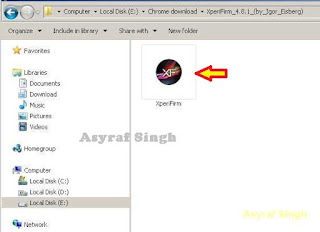
Xperia Firmware Downloader Tool icon - Then the program will open loading windows, to checking for update, requesting log in data, and downloading resource,
loading window xperifirm - When the program fully loaded, now you can select your Sony Xperia model and version in the left navigation windows. You can select Sony Xperia Z5 Dual and then select the model (E6633 Dual).

Download Sony Xperia Z5 Dual Firmware - See on the right panel window, and you will find all country and market which support your Sony Xperia devices.
- For an example we select market from Brazil, and we will know what is android version on the number shown at latest release (if available).

Download Sony Xperia Z5 Dual Firmware - To start download this firmware you can navigate your pointer to the right above of this window, under link donate paypal you can click firmware build number shown.

Download Sony Xperia Z5 Dual Firmware - Then you will see xperia firmware downloader dialogue box appear on your screen. And click Download.

Download Sony Xperia Z5 Dual Firmware - This action will open a new windows browse for folder, you will be asked where will you save your firmware file on your computer. Usually directly go to desktop. But you can change to save to another folder, Once finish decide the folder you can click OK.
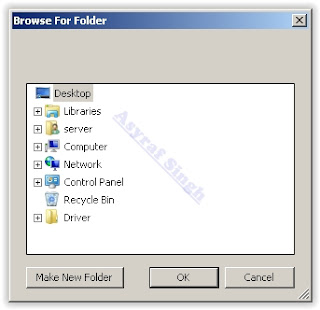
Download Sony Xperia Z5 Dual Firmware - And download process will start now, It will take a minute or hour depending your firmware file size.

Download Sony Xperia Z5 Dual Firmware - Once your download complete, you will see the following pop message “Unpacked Successfully!” Cl ick OK.

Unpacked Successfully xperia firmware download tool - The same “Unpacked successfully!” message will appear on the download dialog. Now you can Click “Close”.

Unpacked Successfully xperia firmware download tool - Now check your download location and you will find a new folder that contains your firmware files.
- Inside the folder download, you should find a number of files that look similar to the picture below.
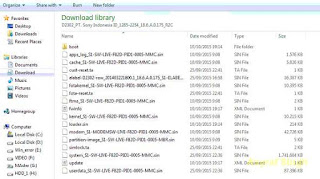
content firmware file - If your list of firmware files includes “fwinfo.xml” as shown below you can manually delete it before continuing to the FlashTool steps. You MUST delete this file otherwise your FTF firmware file will corrupt.

delete fwinfo.xml file - Good luck and feel free to download Sony Xperia Z5 Dual Firmware.


Subscribe to:
Posts (Atom)