Showing posts with label lollipop. Show all posts
Showing posts with label lollipop. Show all posts
Friday, July 29, 2016
Download latest Android Lollipop 5 1 1 stock firmware for Ugoos UM3 TV Box

Download latest Android Lollipop 5.1.1 stock firmware for Ugoos UM3 TV Box from here, here or from here. Download previous firmware from here.
Glad to announce to you what now you can try our new firmware based on Android 5.1. We would appreciate if you tell us about the bugs that you find in the firmware. Also, we will be happy to hear your suggestions for modifying the firmware, which you think would be helpful. Together we can make our devices more usefull for us.
Glad to announce to you what now you can try our new firmware based on Android 5.1. We would appreciate if you tell us about the bugs that you find in the firmware. Also, we will be happy to hear your suggestions for modifying the firmware, which you think would be helpful. Together we can make our devices more usefull for us.
Firmware details
Archive? UM3_3.0 .6
Image: um3_3.0.6.img
FW version: 5.0.00
Archive? UM3_3.0 .6
Image: um3_3.0.6.img
Model: Ugoos UM3 TV Box
Firmware: Android Lollipop 5.1.1 stock
Archive size: 463 MB
Build number: UT3S-userdebug 5.1.1 LMY48G eng.avagetto.20160523.084714 release-keys
SDK version: RK30_ANDROID5.1.1-SDK-v1.00.00
Platform: Rockchip RK3288Firmware: Android Lollipop 5.1.1 stock
Archive size: 463 MB
Build number: UT3S-userdebug 5.1.1 LMY48G eng.avagetto.20160523.084714 release-keys
SDK version: RK30_ANDROID5.1.1-SDK-v1.00.00
FW version: 5.0.00
Boot version: 2.19
Model number: UGOOS-UT3S
Inside archive: firmware + DriverAssitant_v4.3 + AndroidTool v2.3 + ugoos_firmware_upgrade_guide
How to flash this firmware
1. If it first time, you need to install drivers use DriverAssitant or manual when connecting device
2. Run AndroidTool.exe
3. Switch to "Upgrade Firmware" tab
4. Press button "Firmware" and select update image (Example: "ut3_3.0.6.img")
5. Connect device to PC via USB OTG port (full guide by connecting you can find in "ugoos_firmware_upgrade_guide")
6. Press "Upgrade" button
Main changes of version 3.0.6 (23/05/2016) from previous version:
1. Fixed bugs with usb-card mount/unmount.
2. Added exfat support
3. Added Gamepad settings and axes simulation
4. Added TvSettings
5. Replaced Rockchip Filemanager, added Ugoos Filemanager
6. Changed processing logic of Daydream (Screensaver) and Sleep timers.
7. Fixed bug with wakeup after sleep. Now device is not going to the suspend mode
8. Added Cast Receiver app. You can share video to the box from YouTube app on your mobile phone
9. Improved Hardware monitor:
- Added icons
- added Network activity
- added CPU load activity
10. Added screen rotation support
11. Fixed time zone for multi-window mode
12. Updated UgoosLauncher
We already announce some details about the most important improvements and changes:
- Gamepad settings – let you customize your gamepad control settings
- Ugoos File Manager – our new step for making Ugoos TV Boxes more convenient for remote controllers.
- TV Settings - application developed by Google special for Android TV
However, this is not all the news:
Daydream and Sleep Logic. Now we separate setting timer for screensaver and for sleep features. You can set only daydream or sleep or both and set appropriate time. Also you can start it from menu via choosing special menu item. Run Daydream: Settings – Display - Daydream.
TV Settings. We created new icons for TV settings menu in order to reach all Ugoos settings quicker. For most frequent-using Ugoos settings, we redraw pages according to TV settings menu style.
Exfat support. Many users asked about this feature for android 5.1, because it was very useful in 4.4-based firmwares. Now you can use attached hard drives and usb flash drives in exfat file system, share files using built-in Ugoos File server and perform other related tasks.
Screen rotation. Screen rotation feature let use TV Box for a wider amount of non-casual tasks. It becomes more convenient for displaying different types of information. New function let you choose screen positions with five different settings. Forced orientation for all applications added for both vertical (portrait) and horizontal types. Run screen rotation: Settings – Display – Screen rotation
Gamepad settings. We already share details about this new Ugoos feature. In addition, we add one more setting little bit later and didn’t announce about it before. Now you get an ability to simulate axes moves using keyboard. Now you can choose a keyboard in device profile and appoint moves on the buttons you used to for particular gaming experience. Run Gamepad settings: Settings – Ugoos settings – System – Gamepad Settings.
Hardware Monitor. We added new icons with activity visualization, so now you can choose if you want to display only icons or icons and text values also. Added network activity and CPU load activity. Run Hardware Monitor: Settings – Ugoos Settings - System – HW Monitor.


Caution: Please do not update firmware unless you know what you are doing, you really want it or it is absolutely necessary. Firmware updates may occasionally have bad results, like bricking your device, temporarily or permanently. The firmware update process is done entirely at your own risk. Before attempting to update the firmware, back up your data.
Don’t miss any of our future video tutorials, follow us on Youtube. Like us on Facebook. Add us in your circles on Google+. Watch our photo albums on Flickr. Subscribe now to our newsletter.
Model number: UGOOS-UT3S
Inside archive: firmware + DriverAssitant_v4.3 + AndroidTool v2.3 + ugoos_firmware_upgrade_guide
How to flash this firmware
1. If it first time, you need to install drivers use DriverAssitant or manual when connecting device
2. Run AndroidTool.exe
3. Switch to "Upgrade Firmware" tab
4. Press button "Firmware" and select update image (Example: "ut3_3.0.6.img")
5. Connect device to PC via USB OTG port (full guide by connecting you can find in "ugoos_firmware_upgrade_guide")
6. Press "Upgrade" button
Main changes of version 3.0.6 (23/05/2016) from previous version:
1. Fixed bugs with usb-card mount/unmount.
2. Added exfat support
3. Added Gamepad settings and axes simulation
4. Added TvSettings
5. Replaced Rockchip Filemanager, added Ugoos Filemanager
6. Changed processing logic of Daydream (Screensaver) and Sleep timers.
7. Fixed bug with wakeup after sleep. Now device is not going to the suspend mode
8. Added Cast Receiver app. You can share video to the box from YouTube app on your mobile phone
9. Improved Hardware monitor:
- Added icons
- added Network activity
- added CPU load activity
10. Added screen rotation support
11. Fixed time zone for multi-window mode
12. Updated UgoosLauncher
We already announce some details about the most important improvements and changes:
- Gamepad settings – let you customize your gamepad control settings
- Ugoos File Manager – our new step for making Ugoos TV Boxes more convenient for remote controllers.
- TV Settings - application developed by Google special for Android TV
However, this is not all the news:
Daydream and Sleep Logic. Now we separate setting timer for screensaver and for sleep features. You can set only daydream or sleep or both and set appropriate time. Also you can start it from menu via choosing special menu item. Run Daydream: Settings – Display - Daydream.
TV Settings. We created new icons for TV settings menu in order to reach all Ugoos settings quicker. For most frequent-using Ugoos settings, we redraw pages according to TV settings menu style.
Exfat support. Many users asked about this feature for android 5.1, because it was very useful in 4.4-based firmwares. Now you can use attached hard drives and usb flash drives in exfat file system, share files using built-in Ugoos File server and perform other related tasks.
Screen rotation. Screen rotation feature let use TV Box for a wider amount of non-casual tasks. It becomes more convenient for displaying different types of information. New function let you choose screen positions with five different settings. Forced orientation for all applications added for both vertical (portrait) and horizontal types. Run screen rotation: Settings – Display – Screen rotation
Gamepad settings. We already share details about this new Ugoos feature. In addition, we add one more setting little bit later and didn’t announce about it before. Now you get an ability to simulate axes moves using keyboard. Now you can choose a keyboard in device profile and appoint moves on the buttons you used to for particular gaming experience. Run Gamepad settings: Settings – Ugoos settings – System – Gamepad Settings.
Hardware Monitor. We added new icons with activity visualization, so now you can choose if you want to display only icons or icons and text values also. Added network activity and CPU load activity. Run Hardware Monitor: Settings – Ugoos Settings - System – HW Monitor.
Caution: Please do not update firmware unless you know what you are doing, you really want it or it is absolutely necessary. Firmware updates may occasionally have bad results, like bricking your device, temporarily or permanently. The firmware update process is done entirely at your own risk. Before attempting to update the firmware, back up your data.
Don’t miss any of our future video tutorials, follow us on Youtube. Like us on Facebook. Add us in your circles on Google+. Watch our photo albums on Flickr. Subscribe now to our newsletter.

Download latest Android Lollipop 5 1 stock firmware for HomTom HT7 smartphone

Download latest Android Lollipop 5.1 stock firmware for HomTom HT7 smartphone from here, here or from here. Download OTA update firmware from here (59 MB). Download another HomTom firmware from here.
Firmware details
Archive? HOMTOM HT7 Android 5.1 1GB 8GB MTK6580A Smartphone Firmware
Firmware: Android Lollipop 5.1 stock
Project: br6580_weg_l
Firmware details
Archive? HOMTOM HT7 Android 5.1 1GB 8GB MTK6580A Smartphone Firmware
Firmware: Android Lollipop 5.1 stock
Model: HomTom HT7 smartphone
Image file size: 537 MB
Platform: Mediatek MT6580Image file size: 537 MB
Project: br6580_weg_l
Config_version: V1.1.2
BPLGUInfoCustomAppSrcP_MT6580_S00_MOLY_WR8_W1449_MD_WG_MP_V23_1_wg_n
Inside archive: firmware + SP_Flash_Tool_exe_Windows_v5.1520.00.000
BPLGUInfoCustomAppSrcP_MT6580_S00_MOLY_WR8_W1449_MD_WG_MP_V23_1_wg_n
Inside archive: firmware + SP_Flash_Tool_exe_Windows_v5.1520.00.000
Caution: Please do not update firmware unless you know what you are doing, you really want it or it is absolutely necessary. Firmware updates may occasionally have bad results, like bricking your device, temporarily or permanently. The firmware update process is done entirely at your own risk. Before attempting to update the firmware, back up your data.
Don’t miss any of our future video tutorials, follow us on Youtube. Like us on Facebook. Add us in your circles on Google+. Watch our photo albums on Flickr. Subscribe now to our newsletter. Biggest firmware download center.
Thursday, July 28, 2016
Download latest Android Lollipop 5 1 1 Stock Firmware for Huawei Honor 4A SCL TL00 smartphone

Download latest Android Lollipop 5.1.1 Stock Firmware for Huawei Honor 4A SCL-TL00 smartphone from here or here.
Firmware details
Archive: Huawei_4A(SCL-TL00)_2_5.1.1_E?_base_20151016
Archive size: 960 MB
Image: prog_emmc_firehose_8909_ddr-jm.mbn
Model: Huawei Honor 4A SCL-TL00 smartphone
Platform: Qualcomm Snapdragon 210 MSM8909
Platform: Qualcomm Snapdragon 210 MSM8909
Caution: Please do not update firmware unless you know what you are doing, you really want it or it is absolutely necessary. Firmware updates may occasionally have bad results, like bricking your device, temporarily or permanently. The firmware update process is done entirely at your own risk. Before attempting to update the firmware, back up your data.
Don’t miss any of our future video tutorials, follow us on Youtube. Like us on Facebook. Add us in your circles on Google+. Watch our photo albums on Flickr. Subscribe now to our newsletter.
Don’t miss any of our future video tutorials, follow us on Youtube. Like us on Facebook. Add us in your circles on Google+. Watch our photo albums on Flickr. Subscribe now to our newsletter.
Download latest Android Lollipop 5 1 stock firmware for Zopo Color S5 Smartphone

Download latest Android Lollipop 5.1 stock firmware for Zopo Color S5 smartphone from here, here or here.
Download latest Android Lollipop 5.1 stock firmware for Zopo Speed 7 smartphone from here. Download latest Android Lollipop 5.1 stock firmware for Zopo Speed 7C smartphone from here. Download latest Android Lollipop 5.1 stock firmware for Zopo Speed 7 Plus smartphone from here.
Firmware details
Archive? C5320C 20160519-160530 lp1
Firmware: Android Lollipop 5.1 stock
Image: MP_mt6735m_n325b_c5320bs_zwx_cc_64gbitp8d3_lp1_lte_3m-fdd-cs_mul_20160519-160530_songlixin_PC
Project: n325b
Config_version: V1.1.2
Inside archive: firmware + MultiDownloadTool_V1604
Build number: 20160519-160530
Changelog
Compatible camera GC8024.
Download latest Android Lollipop 5.1 stock firmware for Zopo Speed 7 smartphone from here. Download latest Android Lollipop 5.1 stock firmware for Zopo Speed 7C smartphone from here. Download latest Android Lollipop 5.1 stock firmware for Zopo Speed 7 Plus smartphone from here.
Firmware details
Archive? C5320C 20160519-160530 lp1
Firmware: Android Lollipop 5.1 stock
Image: MP_mt6735m_n325b_c5320bs_zwx_cc_64gbitp8d3_lp1_lte_3m-fdd-cs_mul_20160519-160530_songlixin_PC
Model: Zopo Color S5 smartphone
Image file size: 752 MB
Platform: Mediatek MT6735MImage file size: 752 MB
Project: n325b
Config_version: V1.1.2
Inside archive: firmware + MultiDownloadTool_V1604
Build number: 20160519-160530
Changelog
Compatible camera GC8024.
Caution: Please do not update firmware unless you know what you are doing, you really want it or it is absolutely necessary. Firmware updates may occasionally have bad results, like bricking your device, temporarily or permanently. The firmware update process is done entirely at your own risk. Before attempting to update the firmware, back up your data.
Don’t miss any of our future video tutorials, follow us on Youtube. Like us on Facebook. Add us in your circles on Google+. Watch our photo albums on Flickr. Subscribe now to our newsletter. Biggest firmware download center.
Download Stock Rom Moto G 3° Geração XT1544 Dual SIM com Tv Digital Lollipop 5 1 Retail Brasileira

Download Stock Rom / Firmware para Motorola Moto G 2015 3° Geração
Modelo.........................XT1544 (Tv Digital, Dual Sim, 1GB ram)
Região.........................Brasil
Idioma...........................Multi Linguagem
Versão do Android....... 5.1.1 Lollipop
Tamanho....................739 MB
Tutorial.........................Aqui
Downloads
Mega
Google Drive
Android File Host
Fonte XDA Developers
Atenção
Nós do Stock Rom não nos responsabilizamos por quaisquer danos causados nos dispositivos.
A responsabilidade é inteiramente do usuário.
Para mais informações, leia os Termos do site AQUI.
Termos de Busca
Baixar firmware oficial para Motorola Moto g xt1544 3 geração 2015 Como atualizar Motorola Moto g xt1544 3 geração 2015
Rom original e oficial para Motorola Moto g xt1544 3 geração 2015 Rom Brasileira para Moto g xt1544
Download Rom Stock para Moto g xt1544 limpa, sem vinculo ou logo de operadora.
Possibilidade de reviver ou ressuscitar seu Moto g xt1544. Possibilidade de resolver loop ou boot infinito do Moto g xt1544.
Moto g xt1544 liga e só fica na tela ou logo da Motorola Moto g xt1544 só fica na tela de apresentação ou tela de inicio.
Pode flashear essa rom do Moto g xt1544 para resolver esses problemas
Flash Bricked Bootloop LG G3 LG D85521C Lollipop Using LG Flash Tool KDZ method Guide
Flash Bricked - Bootloop LG G3 (LG D85521C - Lollipop) Using LG Flash Tool (KDZ method) [Guide].
Flash LG G3 (LG D85521C - Lollipop). LG G3 (LG D85521C - Lollipop ) is the android smartphone which announced in May 2014, and exactly released on 2014, June. Guidebelajar on this guide will explain to you how to flashing android device on LG G3 (LG D85521C - Lollipop ) with easy and simple step. Flashing in android is the same way like fresh install on the windows PC, So by perform a flash on Android you will give a new performance like a new phone. One reason that you should perform a flash your android is because your android get bootloop or when you failed to install Stock ROM Mod.This LG G3 (LG D85521C - Lollipop ) is the smartphone with 5,5 ITrue HD-IPS + LCD capacitive touchscreen, 16M colors, work on Android OS, v4.4.2 (KitKat), upgradable to v6.0 (Marshmallow) and supported with Quad-core 2.5 GHz Krait 400 CPU, Qualcomm MSM8974AC Snapdragon 801 chipset, combined with 2 GB of RAM and 13 MP of Main camera and 2,1 MP on secondary camera.
Now you can follow this guide if you have bootloop problems on LG G3 (LG D85521C - Lollipop ) but accidental LG G3 (LG D85521C - Lollipop ) is not installed recovery. In this guide Im not offering recovery twrp or Cwm. CMW is a recovery that already in recovery mode for customization of the device such that the LG G3 (LG D85521C - Lollipop ) with a variety of additional functions in it such as backup / restore, installations and others that are not contained in the standard recovery mode. Generally, in case of a default recovery bootloop LG G3 (LG D85521C - Lollipop ) will go missing in case of bootloop. whereas the original recvery cant help when there hardbrick.
Now, follow the instruction list bellow, do it with your own risk.
Requirement Tool For Flash LG G3 (LG D85521C - Lollipop ) .
Before you perform flash or install your firmware on LG G3 (LG D85521C - Lollipop ) ,
you must download all requirement tool below ;
you must download all requirement tool below ;
- Download Stock Rom LG G3 (LG D85521C - Lollipop ). Here
- This Stock is KDZ file, remember to copy this KDZ file into LG Flash Tool 2014 folder
- Download Driver LG: Here
- Latest LG FlashTool : Here
#1. Guide To Flash LG G3 (LG D85521C - Lollipop )
Please follow this guide carefully to flash LG G3 (LG D85521C - Lollipop ) .
- Make sure you have download all requirement tool above
- Then Install the drivers with your phone connected with your Computer, when it finished disconnect your LG G3 (LG D85521C - Lollipop ) phone from your computer.
- Now turn your LG G3 (LG D85521C - Lollipop ) phone off, then continuously click on the volume up button and connect your phone to your PC,
- Now, enter your LG G3 (LG D85521C - Lollipop ) into download mode. ( visit this guide or see at the end of this post)
- Run LGFlashTool2014.exe.
- If you cannot run LGFlashToo2014.exe, You must install Visual C++ Runtime Library, get here
- There are two options to flash your LG G3 (LG D85521C - Lollipop ) .
- Normal Flash : You can select this option if you want Flash ROM without losing any data. Only use this when you need to fix system error.
- CSE Flash : You can choose this option when you need a fresh format. All data will be deleted. Its suitable for upgrading or downgrading ROM or simply use this when you need to back to Stock.
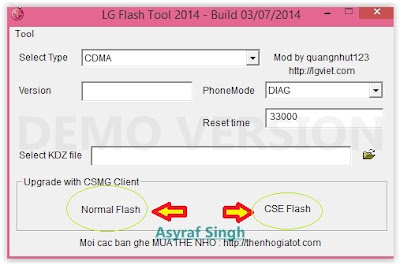
LG flash tool normal flash / CSE flash - Select Type: CDMA
- PhoneMode: DIAG
- Select KDZ file : browse your KDZ file in your drive
- Then you can Click on Normal Flash or CSE Flash (see step 7 to decide this option)
- Then click Start.
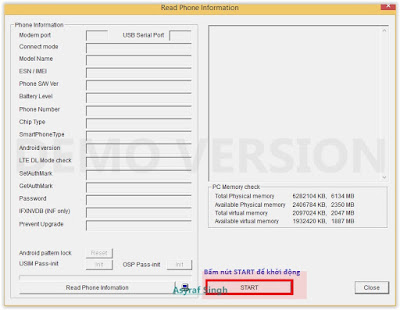
LG flash tool - start - Then click on Clear Phone Software update registry.
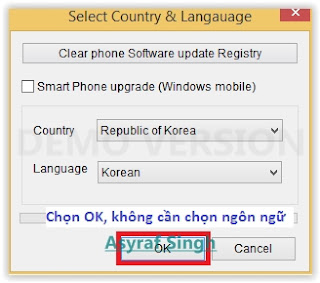
Lg flash tool - Clear Phone Software update registry. - No need to choose desired language, it automatically change to English as a default setting.
- Finally you can click OK.
- You must wait a minute for the LG Mobile Support tool to recognize the LG G3 (LG D85521C - Lollipop ) device.
- When you wait this process, may take 5 minute the tool to recognize it.
- The software will start the extraction on your device.
- When the process reach 100% your LG G3 (LG D85521C - Lollipop ) will reboot.
- Then, you must Unplug your LG G3 (LG D85521C - Lollipop ) from your computer by remove USB Cable from it.,
- Finish,


#2. Guide To Flash LG G3 (LG D85521C - Lollipop )
If #1 method is failed to flash your LG Android device, you can use this second method, flashing LG device using R&D Test Tool
Enter LG G3 (LG D85521C - Lollipop ) To Download Mode.
To enter LG LG G3 (LG D85521C - Lollipop ) in download mode, you can follow this guide :
- Remove battery from your phone
- Plug USB cable to your PC
- Press and Hold volume UP Button, while cable plugs USB Cable from PC to your Phone
- Then will appear white note on your LG G3 (LG D85521C - Lollipop ) phone, if you see this you can releasa Volume UP button.
- Press and hold volume UP Button on your LG G3 (LG D85521C - Lollipop ) phone again, until you see FIRMWARE UPDATE message.
- If your phone has been detected in your PC (to make sure, click the monitor icon beside Read Phone Information button, this action will open device manager windows. If your phone was detected you can see this at the top)
- Click START, and you will see dialogue box, just click OK
- Wait for the flash process, it will run in approximately 5 minute and your LG G3 (LG D85521C - Lollipop ) will restart itself
- Then your LG G3 (LG D85521C - Lollipop ) phone will boot up, if you can see Welcome Screen, its mean Flashing process is successfully.
- Unplug USB cable, and finish
- Now your LG G3 (LG D85521C - Lollipop ) is installed new firmware.
Download Android Lollipop 5 1 1 stock firmware for Arm64 v8a device

Download Android Lollipop 5.1.1 stock firmware for Arm64-v8a device from here or from here. Download previous firmware from here.
Firmware details
Archive: BF1078R-20160513
Image: BF1078R-20160513.img
Archive file size: 435 MB
Platform: Allwinner QuadCore-A64 / arm64-v8a
Company: Allwinner
Caution: Please do not update firmware unless you know what you are doing, you really want it or it is absolutely necessary. Firmware updates may occasionally have bad results, like bricking your device, temporarily or permanently. The firmware update process is done entirely at your own risk. Before attempting to update the firmware, back up your data.
Don’t miss any of our future video tutorials, follow us on Youtube. Like us on Facebook. Add us in your circles on Google+. Watch our photo albums on Flickr. Subscribe now to our newsletter.
Company: Allwinner
Caution: Please do not update firmware unless you know what you are doing, you really want it or it is absolutely necessary. Firmware updates may occasionally have bad results, like bricking your device, temporarily or permanently. The firmware update process is done entirely at your own risk. Before attempting to update the firmware, back up your data.
Don’t miss any of our future video tutorials, follow us on Youtube. Like us on Facebook. Add us in your circles on Google+. Watch our photo albums on Flickr. Subscribe now to our newsletter.
Download latest Android Lollipop 5 1 stock firmware for HomTom HT3 smartphone

Download latest Android Lollipop 5.1 stock firmware for HomTom HT3 smartphone from here, here or from here. Download another HomTom firmware from here.
Firmware details
Archive? HOMTOM HT3 Android 5.1 1GB 8GB MTK6580A Smartphone Firmware
Firmware: Android Lollipop 5.1 stock
Project: br6580_weg_l
Firmware details
Archive? HOMTOM HT3 Android 5.1 1GB 8GB MTK6580A Smartphone Firmware
Firmware: Android Lollipop 5.1 stock
Model: HomTom HT3 smartphone
Image file size: 564 MB
Platform: Mediatek MT6580AImage file size: 564 MB
Project: br6580_weg_l
Config_version: V1.1.2
BPLGUInfoCustomAppSrcP_MT6580_S00_MOLY_WR8_W1449_MD_WG_MP_V23_1_wg_n
Inside archive: firmware + SP_Flash_Tool_exe_Windows_v5.1520.00.000
BPLGUInfoCustomAppSrcP_MT6580_S00_MOLY_WR8_W1449_MD_WG_MP_V23_1_wg_n
Inside archive: firmware + SP_Flash_Tool_exe_Windows_v5.1520.00.000
Caution: Please do not update firmware unless you know what you are doing, you really want it or it is absolutely necessary. Firmware updates may occasionally have bad results, like bricking your device, temporarily or permanently. The firmware update process is done entirely at your own risk. Before attempting to update the firmware, back up your data.
Don’t miss any of our future video tutorials, follow us on Youtube. Like us on Facebook. Add us in your circles on Google+. Watch our photo albums on Flickr. Subscribe now to our newsletter. Biggest firmware download center.
Download Android Lollipop 5 1 stock firmware for Mlais MX Base smartphone

Download Android Lollipop 5.1 stock firmware for Mlais MX Base smartphone from here, here or here. Download previous firmware from here. Download another Mlais firmware from here.
Firmware details
Archive: Mlais_MX_20151102
Image: 20151102_c227v35_jbl_mlais
Archive size: 699 MB
Support: Mediatek MT6735
Project: c227v35_jbl_mlais
Config_version: V1.1.2
Build number: c227v35_jbl_mlais-user 5.1 LMY47D 1446456795 test-keys
Caution: Please do not update firmware unless you know what you are doing, you really want it or it is absolutely necessary. Firmware updates may occasionally have bad results, like bricking your device, temporarily or permanently. The firmware update process is done entirely at your own risk. Before attempting to update the firmware, back up your data.
Don’t miss any of our future video tutorials, follow us on Youtube. Like us on Facebook. Add us in your circles on Google+. Watch our photo albums on Flickr. Subscribe now to our newsletter.
Wednesday, July 27, 2016
Download latest Android Lollipop 5 1 stock firmware for Ulefone Vienna smartphone

Download latest Android Lollipop 5.1 stock firmware for Ulefone Vienna smartphone from here, here or here.
Firmware details
Archive name: ulefone Vienna_Android 5.1_20160511
Archive file size: 810 MB
Image: ulefone Vienna_Android 5.1_20160511
Support: Mediatek MT6753
Project: long6753_65uc_l1
Config_version: V1.1.2
Build number: full_long6753_65uc_l1-user 5.1 LMY47D 1462934737 test-keys
Inside archive: firmware + drivers + Flashing tool for ulefone Vienna v3.1516.rar + Instructions of Power Flashing.docx
Caution: Please do not update firmware unless you know what you are doing, you really want it or it is absolutely necessary. Firmware updates may occasionally have bad results, like bricking your device, temporarily or permanently. The firmware update process is done entirely at your own risk. Before attempting to update the firmware, back up your data.
Don’t miss any of our future video tutorials, follow us on Youtube. Like us on Facebook. Add us in your circles on Google+. Watch our photo albums on Flickr. Subscribe now to our newsletter.
Download latest Android Lollipop 5 1 stock firmware for Cube T8 Plus tablet

Download latest Android Lollipop 5.1 stock firmware for Cube T8 Plus tablet from here or here. Download previous firmware from here. Download latest Android Lollipop 5.1 stock firmware for Cube T8 tablet from here. Download another Cube firmware from here.
Firmware details
Archive name: T8-PLUS_V1.0_20160218
Image: 0502L800C_UE78_T8PG4W10F13TTEXLX8C(MTP)_G217_IND_FULL
Archive file size: 721 MB
Project: htt8783_tb_l1
Platform: Mediatek MT6753
Config_version: V1.1.2
Inside archive: firmware + SP_Flash_Tool_exe_Windows_v5.1516.00 + drivers (SP_Drivers_v2.0. + Driver_Auto_Installer)
Caution: Please do not update firmware unless you know what you are doing, you really want it or it is absolutely necessary. Firmware updates may occasionally have bad results, like bricking your device, temporarily or permanently. The firmware update process is done entirely at your own risk. Before attempting to update the firmware, back up your data.
Don’t miss any of our future video tutorials, follow us on Youtube. Like us on Facebook. Add us in your circles on Google+. Watch our photo albums on Flickr. Subscribe now to our newsletter.
Don’t miss any of our future video tutorials, follow us on Youtube. Like us on Facebook. Add us in your circles on Google+. Watch our photo albums on Flickr. Subscribe now to our newsletter.
Download Android Lollipop 5 1 stock firmware for Lenovo Zuk Z1 smartphone

Download Android Lollipop 5.1 stock firmware for Lenovo Zuk Z1 smartphone from here or here. Download another Lenovo firmware from here.
Firmware details
Archive: Lenovo Zuk Z1 Android 5.1 Snapdragon 801 Firmware 160224 191240
Archive size: 596 MB
Support: Qualcomm Snapdragon 801
MBM File: prog_emmc_firehose_8974.mbn
Caution: Please do not update firmware unless you know what you are doing, you really want it or it is absolutely necessary. Firmware updates may occasionally have bad results, like bricking your device, temporarily or permanently. The firmware update process is done entirely at your own risk. Before attempting to update the firmware, back up your data.
Don’t miss any of our future video tutorials, follow us on Youtube. Like us on Facebook. Add us in your circles on Google+. Watch our photo albums on Flickr. Subscribe now to our newsletter.
Subscribe to:
Posts (Atom)