Showing posts with label enjoy. Show all posts
Showing posts with label enjoy. Show all posts
Thursday, July 28, 2016
Enjoy Etisalat Chatpak Using OpenVpn
Earlier on I explained how to connect Etisalat social plans using Tweakware to browse unlimitedly.
Now well look at connecting it with OpenVpn.

Subscribe for any of the Plans
*200*3*4*2*1*1# Cost N100
*200*3*4*2*2*1# Cost N300Enjoy
Download the latest OpenVpn from here
Note: Make sure you download the latest one above because its the one that works.Download etisalat Chat Pack configuration files
Once you download the file, unzip and move then to your parent folder.i.e SDcard
After installation, launch and select option >>import >> Import file from Sdcard.
Select the files in .ovpn extension importing them one after the other.
Select a server and username and password will be required.
Openvpn password is changed every week, so youll have to continually update the password from Ovpn Website. Although,username remains constant being vpnbook.
Here is the password for this week: t5baChus
Input username and password, connect and youre good to go. Unlike Tweakware it has no limited bandwidth.
Enjoy!
Now well look at connecting it with OpenVpn.
Subscribe for any of the Plans
*200*3*4*2*1*1# Cost N100
*200*3*4*2*2*1# Cost N300Enjoy
Download the latest OpenVpn from here
Note: Make sure you download the latest one above because its the one that works.Download etisalat Chat Pack configuration files
Once you download the file, unzip and move then to your parent folder.i.e SDcard
After installation, launch and select option >>import >> Import file from Sdcard.
Select the files in .ovpn extension importing them one after the other.
Select a server and username and password will be required.
Openvpn password is changed every week, so youll have to continually update the password from Ovpn Website. Although,username remains constant being vpnbook.
Here is the password for this week: t5baChus
Input username and password, connect and youre good to go. Unlike Tweakware it has no limited bandwidth.
Enjoy!

Tuesday, July 26, 2016
Enjoy Etisalat Unlimited Browsing With iPhone iPad Using OpenVpn for iphone
I have been getting series of messages from Iphone users because they are unable to use the etisalat smart pack cheat.Here is a good news to iphone users, Openvpn has fix the issue of import file and you can now enjoy etisalat unlimited browsing on your iphon/ipad the way we enjoy it on our android phone. No long story, the steps are straight forward just follow them and rock on your iphone with Etisalat social pack browsing no expiring date

Dial *200*3*3*2*1*1# to subscribe and N100 or N50 will be deducted
How to Use Open VPN on iPhone/iPad with Etisalat Unlimited Browsing
1. Click HERE to download and install OpenVpn on your iphone/ipad
2. Click HERE to download config file and extract the config file to .ovpn file
3. Then Import the files to your Openvpn
4. Now input the username and password below
Username: vpnbook
Password: binbd5ar
Note: New password is generating after some days so you have to get new one.
Any time you try to connect and you saw authentication failed it means you need to use new password.
Visit www.vpnbook.com/freevpn to get the latest password for free
5. Then click connect and start enjoying etisalat social pack with your iphone.
Dial *200*3*3*2*1*1# to subscribe and N100 or N50 will be deducted
How to Use Open VPN on iPhone/iPad with Etisalat Unlimited Browsing
1. Click HERE to download and install OpenVpn on your iphone/ipad
2. Click HERE to download config file and extract the config file to .ovpn file
3. Then Import the files to your Openvpn
4. Now input the username and password below
Username: vpnbook
Password: binbd5ar
Note: New password is generating after some days so you have to get new one.
Any time you try to connect and you saw authentication failed it means you need to use new password.
Visit www.vpnbook.com/freevpn to get the latest password for free
5. Then click connect and start enjoying etisalat social pack with your iphone.
Friday, July 22, 2016
Another Means For PC Users To Enjoy MTN Unlimited Surfing With N0 0kobo
OpenVPN is still working very well for MTN Unlimited Surfing With N0.0kobo, but here is another alternative for the PC users to enjoy this tweak to the fullest.

For The PC Users To Browse With MTN Unlimited Free Surfing Via SimpleServer
» Download and extract this customized SS-for-Mtn-N0.0kobo Surfing to a new folder on your desktop background.
Connect Your Modem With:
» Open the file you extracted, double-click "SimpleServer.exe"and make sure is always on open.
» Configure your Browsers and IDM to 127.0.0.1 Port 8080
» Remember to tick: "Use this proxy server for all protocols" if you want it to open all secured sites.
Keep flexing with MTN without paying dine.
Connect Your Modem With:
» APN: web.gprs.mtnnigeria.net.
» Proxy: leave it empty
» Port: leave it empty
» Open the file you extracted, double-click "SimpleServer.exe"and make sure is always on open.
» Configure your Browsers and IDM to 127.0.0.1 Port 8080
» Remember to tick: "Use this proxy server for all protocols" if you want it to open all secured sites.
Keep flexing with MTN without paying dine.
Share with your loved ones too!
Tuesday, July 19, 2016
Enjoy Etisalat Unlimited Browsing With Tweakware
There are four (4) VPN softwares working with Etisalat social pack unlimited browsing,Psiphon vpn, OpenVPN, Simple Server and JWP. Today another VPN software join the race and is a user friendly software.For those that dont like too much configuration this is the best option for them.
Tweakware app is available on Pc and mobile devices. The mobile version seems to be Unlimited unlike the PC version which is demo and you need to upgrade your account to premium account to enjoy full access, You dont need to put any host address or IP proxy on tweaking so let’s get started on how to use it with etisalat social pack or mtn bis....I have made the guide simple so that you wont have any trouble.

To Subscribe for Etisalat Social pack dial *200*3*3*2*1*1#
How To use Etisalat social pack with Tweakware on android devices
For Mobile Settings use
Use your Etisalat default mobile internet settings
Make sure your APN is etisalat
Or use
Apn: Etisalat
Proxy: 127.0.0.1
Port: 8080
On Tweakware app
Click HERE to download and install Tweakware on your android device.
Now launch the tweakware and click option and settings.
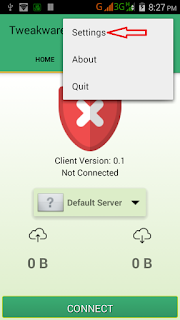
Then click on Bundled Settings

Mark Use Bundled Setting

Click on Select Bundled Setting and choose ETI CHAT PACK

Now go back to your tweakware app home and click connect and wait for the tweakware to show connected.

Then minimize and enjoy your unlimited browsing with tweakware app.

Subscribe to:
Posts (Atom)