Showing posts with label browsing. Show all posts
Showing posts with label browsing. Show all posts
Tuesday, July 26, 2016
Enjoy Etisalat Unlimited Browsing With iPhone iPad Using OpenVpn for iphone
I have been getting series of messages from Iphone users because they are unable to use the etisalat smart pack cheat.Here is a good news to iphone users, Openvpn has fix the issue of import file and you can now enjoy etisalat unlimited browsing on your iphon/ipad the way we enjoy it on our android phone. No long story, the steps are straight forward just follow them and rock on your iphone with Etisalat social pack browsing no expiring date

Dial *200*3*3*2*1*1# to subscribe and N100 or N50 will be deducted
How to Use Open VPN on iPhone/iPad with Etisalat Unlimited Browsing
1. Click HERE to download and install OpenVpn on your iphone/ipad
2. Click HERE to download config file and extract the config file to .ovpn file
3. Then Import the files to your Openvpn
4. Now input the username and password below
Username: vpnbook
Password: binbd5ar
Note: New password is generating after some days so you have to get new one.
Any time you try to connect and you saw authentication failed it means you need to use new password.
Visit www.vpnbook.com/freevpn to get the latest password for free
5. Then click connect and start enjoying etisalat social pack with your iphone.
Dial *200*3*3*2*1*1# to subscribe and N100 or N50 will be deducted
How to Use Open VPN on iPhone/iPad with Etisalat Unlimited Browsing
1. Click HERE to download and install OpenVpn on your iphone/ipad
2. Click HERE to download config file and extract the config file to .ovpn file
3. Then Import the files to your Openvpn
4. Now input the username and password below
Username: vpnbook
Password: binbd5ar
Note: New password is generating after some days so you have to get new one.
Any time you try to connect and you saw authentication failed it means you need to use new password.
Visit www.vpnbook.com/freevpn to get the latest password for free
5. Then click connect and start enjoying etisalat social pack with your iphone.

Sunday, July 24, 2016
How To Run Mobdro on PC to Watch Dstv Channels using unlimited browsing
Mobdro is an android app is the no.1 and the best among the tv apps, and is divided into eleven categories such as News, Shows, Movies, Sports, Music, Gaming, Animals, Tech, Podcasts, Spiritual and others.
Many people use to ask if there is Mobdro for Pc. Mobdro is available on android device only, but today i will show you how i use mobdro and other android apps on Pc with my free unlimited browsing.
What you need to know
1. Learn how to share Psiphon, Tweakware, OpenVpn and JWP Internet Network from Your Mobile Device to PC. Click the links below to learn it
Link 1
Link 2
2. Learn how to install and run Bluestacks on Pc. Click the Link below to learn it
Link
3. Learn how to use unlimited free browsing using etisala social pack or MTN bblite (Is available in our blog)
How To Run Mobdro on Pc with Unlimited free browsing
1. Share your Mobile vpns network to Pc
2. Install Mobdro android app on your bluestacks
3. Run your Mobdro app and enjoy dstv channels on pc for free


Why dont you like/share this post? It doesnt take too much time....
Click here to SUBSCRIBE to this Blog to Receive future updates..
Friday, July 22, 2016
How To Reactivate Your Etisalat Social Pack Unlimited Browsing
Yesterday night while I was enjoying the chat pack cheat, Etisalat disconnect Etisalat Social pack and I notice that all my vpns are not connecting, but this is not the end of Etisalat unlimited browsing. Etisalat social pack is still active so we dont need to worry; I am currently using Etisalat social pack right now.

What you need to reactivate your Etisalat unlimited browsing using Etisalat social pack.
Simply recharge your etisalat sim with N100 card, and the N100 will automatically deduct from your account for social pack auto renewal. Make sure you check your balance to confirm the renewal before you start you browsing.
Now you can continue enjoying your unlimited Etisalat social pack as usual.
Note: For now we dont know whether the plan will exceed 24hrs, but we are now on testing mode and we will confirm it after 24hrs of usage
For New users dial *200*3*3*2*1*1# to activate
What you need to reactivate your Etisalat unlimited browsing using Etisalat social pack.
Simply recharge your etisalat sim with N100 card, and the N100 will automatically deduct from your account for social pack auto renewal. Make sure you check your balance to confirm the renewal before you start you browsing.
Now you can continue enjoying your unlimited Etisalat social pack as usual.
Note: For now we dont know whether the plan will exceed 24hrs, but we are now on testing mode and we will confirm it after 24hrs of usage
For New users dial *200*3*3*2*1*1# to activate
Thursday, July 21, 2016
Airtel Unlimited Browsing
Airtel Introduced Timely Based Data Plan For
Unlimited Downloading
Yea! This is just what I’m talking about and have
been anticipating this feature for a very long
time. That is if its not deception from the pit of
Airtel Network.
I can tell you that there is nothing as good as a
timely based unlimited data plan in an
environment of good network reception.
Despite the fact that I’m hating Airtel network, I
think I’m going to give this a try just for
downloading purposes.
Airtel one of the giant Telecom company silently
introduced a timely based unlimited data plan
which is different from all their packages. This
timely based plan works with time, as soon as
your time expires, it seizes to connect. But while
your time is on sessiosion, you can downloaded
Dubai hotel inside your smartphone or PC.
The plans are;
5min for N15
10min for N30
30min for N90
60min for N180
Note
Airtel NG says this data subscription are not
capped but are unlimited.
Will it Work on my Device?
It works on all devices without any strange
configuration
How Can I Subscribe For This Package?
Dial *439# and follow the prompt to get you
started.
This plan is suitable for downloading and not for
normal surfing of the internet. So if you have any
heavy files to download in gigs, go ahead and
kill Airtel server until your N180 expires.
Tuesday, July 19, 2016
Enjoy Etisalat Unlimited Browsing With Tweakware
There are four (4) VPN softwares working with Etisalat social pack unlimited browsing,Psiphon vpn, OpenVPN, Simple Server and JWP. Today another VPN software join the race and is a user friendly software.For those that dont like too much configuration this is the best option for them.
Tweakware app is available on Pc and mobile devices. The mobile version seems to be Unlimited unlike the PC version which is demo and you need to upgrade your account to premium account to enjoy full access, You dont need to put any host address or IP proxy on tweaking so let’s get started on how to use it with etisalat social pack or mtn bis....I have made the guide simple so that you wont have any trouble.

To Subscribe for Etisalat Social pack dial *200*3*3*2*1*1#
How To use Etisalat social pack with Tweakware on android devices
For Mobile Settings use
Use your Etisalat default mobile internet settings
Make sure your APN is etisalat
Or use
Apn: Etisalat
Proxy: 127.0.0.1
Port: 8080
On Tweakware app
Click HERE to download and install Tweakware on your android device.
Now launch the tweakware and click option and settings.
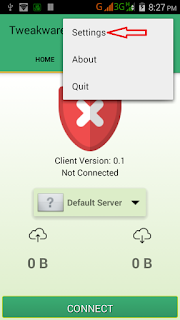
Then click on Bundled Settings

Mark Use Bundled Setting

Click on Select Bundled Setting and choose ETI CHAT PACK

Now go back to your tweakware app home and click connect and wait for the tweakware to show connected.

Then minimize and enjoy your unlimited browsing with tweakware app.

Subscribe to:
Posts (Atom)