Showing posts with label tweakware. Show all posts
Showing posts with label tweakware. Show all posts
Tuesday, July 19, 2016
Enjoy Etisalat Unlimited Browsing With Tweakware
There are four (4) VPN softwares working with Etisalat social pack unlimited browsing,Psiphon vpn, OpenVPN, Simple Server and JWP. Today another VPN software join the race and is a user friendly software.For those that dont like too much configuration this is the best option for them.
Tweakware app is available on Pc and mobile devices. The mobile version seems to be Unlimited unlike the PC version which is demo and you need to upgrade your account to premium account to enjoy full access, You dont need to put any host address or IP proxy on tweaking so let’s get started on how to use it with etisalat social pack or mtn bis....I have made the guide simple so that you wont have any trouble.

To Subscribe for Etisalat Social pack dial *200*3*3*2*1*1#
How To use Etisalat social pack with Tweakware on android devices
For Mobile Settings use
Use your Etisalat default mobile internet settings
Make sure your APN is etisalat
Or use
Apn: Etisalat
Proxy: 127.0.0.1
Port: 8080
On Tweakware app
Click HERE to download and install Tweakware on your android device.
Now launch the tweakware and click option and settings.
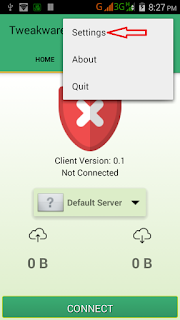
Then click on Bundled Settings

Mark Use Bundled Setting

Click on Select Bundled Setting and choose ETI CHAT PACK

Now go back to your tweakware app home and click connect and wait for the tweakware to show connected.

Then minimize and enjoy your unlimited browsing with tweakware app.


Monday, July 18, 2016
How To Share Psiphon Tweakware OpenVpn and JWP Internet Network From Your Mobile Device To PC
In our previous post, I showed you guys how to share your Mobile VPN connection with PC using DF Tethering Fix App. Today am going to show you how to power your pc with internet connection from your mobile device using great software called PdaNET+.

PdaNet+ is one of the top Android applications of all time. PdaNet+ shares the Internet access of your Android phone with your computer or tablet. PdaNet+ works on all Android phones without rooting.
PdaNet+ allows your laptop to go online wirelessly through your VPNS network on your Android devices. No need to set any proxy and port on your Pc browsers is a direct internet connection from your mobile device. Now follow the steps below to get started.
Requirement
1. Android Mobile device
2. USB Cable
3. PC
Software’s Needed
1. PdaNET+ for android device Click HERE to download
2. PdaNET+ for PC Click HERE to download
How To Share Your Mobile Vpn network to Pc using PdaNET+
1. Install PdaNET+ for android device on your phone
2. Lunch PdaNET+ on your phone and Activate USB TENDER

Note: Make sure you enable USB debugging
3. Now install PdaNET+ for PC on your PC
4. Connect your mobile device via USB cable to your PC
Note: Make sure your Vpns software such as Psiphon, openVpn, Tweakware or JWP is already connected on your mobile device.
5. Now open the PdaNET+ on your Pc click “connect internet”, it will verify and authenticate your connection and it will show connected.


Now you successfully shared you VPNS Network with your PC and you can now use your PC without any proxy or simple server.
Subscribe to:
Posts (Atom)