Showing posts with label etisalat. Show all posts

Thursday, July 28, 2016

Enjoy Etisalat Chatpak Using OpenVpn

Earlier on I explained how to connect Etisalat social plans using Tweakware to browse unlimitedly. 
Now well look at connecting it with OpenVpn.


Subscribe for any of the Plans
*200*3*4*2*1*1# Cost N100 
*200*3*4*2*2*1# Cost N300Enjoy
Download the latest OpenVpn from here
Note: Make sure you download the latest one above because its the one that works.Download etisalat Chat Pack configuration files

Once you download the file, unzip and move then to your parent folder.i.e SDcard
After installation, launch and select option >>import >> Import file from Sdcard. 

Select the files in .ovpn extension importing them one after the other. 

Select a server and username and password will be required. 
Openvpn password is changed every week, so youll have to continually update the password from Ovpn Website. Although,username remains constant being vpnbook.
Here is the password for this week: t5baChus

Input username and password, connect and youre good to go. Unlike Tweakware it has no limited bandwidth. 

Enjoy!

Get

Read more »

Wednesday, July 27, 2016

How Activate Your Etisalat 4GB Data

For those that did not get this free 4gb data, today is another day and you can get yours too. But this time around is selecting sim card.

Please dont say is not working, because I did it today and I received a positive respond.


HOW TO GET FREE 4GB ETISALAT DATA


Dial *8186*1# on your Etisalat sim card

If you get a respond like Your request is processing...... That is a positive respond, Just keep calm and wait for your free 4gb data. Note that it may take more than 1day before they credit your 4gb data to your sim card.


But if you get a respond like sorry, the operation failed..... kindly try another Etisalat sim card please. - See more at: http://www.ufarblog.com/2016/04/you-can-still-activate-etisalat-free.html#sthash.c3h1wolt.dpuf

Get

Read more »

Tuesday, July 26, 2016

Enjoy Etisalat Unlimited Browsing With iPhone iPad Using OpenVpn for iphone

I have been getting series of messages from Iphone users because they are unable to use the etisalat smart pack cheat.Here is a good  news to iphone users, Openvpn has fix the issue of import file and you can now enjoy etisalat unlimited browsing on your iphon/ipad the way we enjoy it on our android phone. No long story, the steps are straight forward just follow them and rock on your iphone with Etisalat social pack browsing no expiring date


Dial *200*3*3*2*1*1# to subscribe and N100 or N50 will be deducted

How to Use Open VPN on iPhone/iPad with Etisalat Unlimited Browsing

1. Click HERE to download and install OpenVpn on your iphone/ipad

2. Click HERE to download config file and extract the config file to .ovpn file

3. Then Import the files to your Openvpn

4. Now input the username and password below

Username: vpnbook

Password: binbd5ar

Note: New password is generating after some days so you have to get new one.

Any time you try to connect and you saw authentication failed it means you need to use new password.

Visit www.vpnbook.com/freevpn to get the latest password for free

5. Then click connect and start enjoying etisalat social pack with your iphone.


Get

Read more »

Friday, July 22, 2016

How To Reactivate Your Etisalat Social Pack Unlimited Browsing

Yesterday night while I was enjoying the chat pack cheat, Etisalat disconnect Etisalat Social pack and I notice that all my vpns are not connecting, but this is not the end of Etisalat unlimited browsing. Etisalat social pack is still active so we dont need to worry; I am currently using Etisalat social pack right now.


What you need to reactivate your Etisalat unlimited browsing using Etisalat social pack.

Simply recharge your etisalat sim with N100 card, and the N100 will automatically deduct from your account for social pack auto renewal. Make sure you check your balance to confirm the renewal before you start you browsing.
Now you can continue enjoying your unlimited Etisalat social pack as usual.

Note: For now we dont know whether the plan will exceed 24hrs, but we are now on testing mode and we will confirm it after 24hrs of usage

For New users dial *200*3*3*2*1*1# to activate

Get

Read more »

Excellent IPs for etisalat social pack users


Image result for etisalatNo doubt THIS BLOG has been  one of the best cheat site so far now we bring you UPDATED: excellent IPs for etisalat social paks users For those using any Etisalat social chat paks with SIMPLE SERVER, PSHIPHON, AND JWP , if your browsing is still slow use any of the below IPs to fire it up.>> 178.32.63.223----3128
 45.55.62.204------8080
 24.157.37.61------8080
177.234.0.110-----3130
177.234.25.178----8080
103.10.22.242------3128
 92.222.45.88-------8888
Some complained that the chat pack cheats stopped working after three days, this new IP Address should solve that problem.

Get

Read more »

Tuesday, July 19, 2016

Enjoy Etisalat Unlimited Browsing With Tweakware

  There are four (4) VPN softwares working with Etisalat social pack unlimited browsing,Psiphon vpn, OpenVPN, Simple Server and JWP. Today another VPN software join the race and is a user friendly software.For those that dont like too much configuration this is the best option for them.

Tweakware app is available on Pc and mobile devices. The mobile version seems to be Unlimited unlike the PC version which is demo and you need to upgrade your account to premium account to enjoy full access, You dont need to put any host address or IP proxy on tweaking so let’s get started on how to use it with etisalat social pack or mtn bis....I have made the guide simple so that you wont have any trouble.


To Subscribe for Etisalat Social pack dial *200*3*3*2*1*1#


How To use Etisalat social pack with Tweakware on android devices

For Mobile Settings use
Use your Etisalat default mobile internet settings
Make sure your APN is etisalat

Or use

Apn: Etisalat
Proxy: 127.0.0.1
Port: 8080


On Tweakware app

Click HERE to download and install Tweakware on your android device.

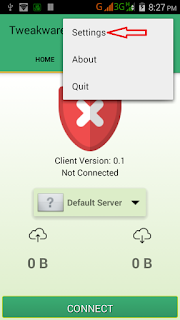
Now launch the tweakware and click option and settings.


Then click on Bundled Settings


Mark Use Bundled Setting


Click on Select Bundled Setting and choose ETI CHAT PACK

Now go back to your tweakware app home and click connect and wait for the tweakware to show connected.

Then minimize and enjoy your unlimited browsing with tweakware app.


Get

Read more »

Get Etisalat free 1Gb data on Your Sim

?

Latest Etisalat 1GB Reloaded…
Tweak dis imei @
353709060973426
After successful tweaking…
Naw go to ur msg and text
DATA to 8186
or dial
*8186#
Gud luck

Get

Read more »

Monday, July 18, 2016

Etisalat Free Internet trick 2016 with Psiphon – NO IP Port needed working flawlessly

Etisalat Internet trick rocks again with Psiphon app. This time around, the trick works with no IP address and port. Just few setups away and you’re done.
Note: more cheats to be dropped on our facebook page..Click here to like our facebook page so that you will not be left out.

How to Setup the NO IP & Port Etisalat free Internet trick?

1.       Firstly, download the Psiphon Pro Lite handler here.

2.       After that, install and launch the application.

3.       On the handler menu, config using the following details…

    Tick Reverse Proxy box

    Proxy type: Reverse Proxy
    Proxy Server: www.twitter.com
    Real Proxy Type: Inject
    Real Proxy Server:
    Real Proxy Port: 80
    …. Save…

Once you’ve done the above settings, make sure you swipe to “options” go to “more options” and leave all field blank…. Remember to go to mobile network and set APN: etisalat and leave other fields blank...

Now connect and start surfing without limits……………

This trick works perfectly once you’re on Etisalat Socialme or Chat pack plan… it also works with 0.0k, but if you’re not subscribed to any of those plans, then it might take time to connect… so I advise you remain on Etisalat Socialme or chat pack plan to enjoy the trick to the fullest.

Further assistance? Do let me know via comment section…


Get

Read more »