Showing posts with label joy. Show all posts
Showing posts with label joy. Show all posts
Thursday, July 28, 2016
Guide How to Flash Stock ROM on Android OPPO JOY 3 to Fix a Bootloop Stuck Removing Malware
[Guide] How to Flash Stock ROM on Android OPPO JOY 3 to Fix a Bootloop, Stuck, Removing Malware.
Flash Stock ROM on Android OPPO JOY 3. This guide will help you to Flash Stock ROM on Android OPPO JOY 3 Smartphone. By flashing your Android phone you can get something new on your phone, such as new experience to use latest update of Stock ROM, or new installed Stock ROM after your phone died or bootloop, and much more. Before we proceed to flash this Android OPPO JOY 3 Smartphone, let we know what is detail specification of this Android smartphone.OPPO JOY 3 was released On 2015, August. And OPPO JOY 3 is the smartphone that comes with 4,5 Inches IPS LCD capacitive touchscreen, 16M colors, Run on Android OS, v4.4 (KitKat) - ColorOS 2.0 UI as it Operating System and supported with Mediatek MT6582 Chipset, Quad-core 1.3 GHz Cortex-A7 CPU, GPU Mali-400MP2, combined with 1 GB of RAM as their engine. And you can enjoy exciting 5 MP on main camera, and 2 MP on secondary camera.
Now, we start to flash Stock ROM on Android OPPO JOY 3 Smartphone. Just follow this guide below carefully. take your own risk, a damage or broken phone by following this tutorial is not our responsibility.
Guide Flash Stock ROM OPPO JOY 3.
Before you flash OPPO JOY 3 you must read this instruction carefully, so. you can get best result at the end of your flash.
Preparation.
- Make sure you have enough battery capacity on your OPPO JOY 3. Its recomended you have at least 80% of battery capacity.
- Always backup your important file (contact, music, video, app) that stored on OPPO JOY 3,
- Prepare the Memory Card / SD Card which has a V-Gen Brand. For some reason OPPO JOY 3 does not recognized besides V-Gen Memory card.
- Then download OPPO JOY 3 Stock ROM.
- Oppo JOY 3
- Once download finish, now copy Stock ROM from computer to the phone memory or SD Card. but note that you copy this ROM at outside not to the public folder for easy finding. (if you download ROM Via PC)
- But, Stock ROM can be download directly from yourAndroid phone. And you must have a good and stable internet connection for it, such as Wi-Fi connection.
- Rom download directly from the Android phone located in the File Manager / phone / download.
http://assorted.downloads.oppo.com/firmware/A11w/A11wEX_11.A.06_OTA_INT_006_all_151022.zip
Flashing Stock ROM.
- To start flashing Stock ROM on OPPO JOY 3 you must enter Recovery Mode. how to do it ?
- Press and Hold Power Button + Volume Down.
- Then you will see menu like this picture. You can select English
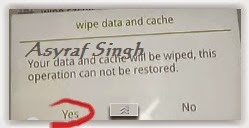
- Select Wipe data and cache by pressing the power button. for Up and down choice, use the volume keys Up / Down, on the next Popup screen select Wipe your data cache to make faster process.
- If appears confirmation you can select : "YES"
- Then you will bring to previous menu, and you can select Install form sd.
- Now you will see 2 options. From mobile phone storage & form SD,.
- Previously you have copy firmware file on SD Card, So. now you must select From SD. and now you can see your Firmware file name on this screen.(Stock rom name is similar as shown on the picture below)
- Select this file name using Power Button
- For Up or Down navigation you can use volume Up and Down Button.
- Then you will see a confirmation page, and you can select yes to proceed this flash on OPPO JOY 3
- Just wait the process finish updating system, and your OPPO JOY 3 will ask to you to reboot the device.
- Now you have finished flash Stock ROM on Android OPPO JOY 3 Smartphone.
 |
| Flash Bootloop OPPO JOY 3 |
 |
| Flash Bootloop OPPO JOY 3 |
 |
| Flash Bootloop OPPO JOY 3 |
 |
| Flash Bootloop OPPO JOY 3 |
 |
| Flash Bootloop OPPO JOY 3 |
 |
| Flash Bootloop OPPO JOY 3 |
 |
| Flash Bootloop OPPO JOY 3 |
 |
| Flash Bootloop OPPO JOY 3 |

Flash Bricked Bootloop LG JOY LG H221G LEAP WIRELESS Using LG Flash Tool KDZ method Guide
Flash Bricked - Bootloop LG JOY (LG H221G LEAP WIRELESS) Using LG Flash Tool (KDZ method) [Guide].
Flash LG JOY (LG H221G LEAP WIRELESS). LG JOY (LG H221G LEAP WIRELESS) is the android smartphone which announced in February 2015, and exactly released on 2015, May. Guidebelajar on this guide will explain to you how to flashing android device on LG JOY (LG H221G LEAP WIRELESS) with easy and simple step. Flashing in android is the same way like fresh install on the windows PC, So by perform a flash on Android you will give a new performance like a new phone. One reason that you should perform a flash your android is because your android get bootloop or when you failed to install Stock ROM Mod.This LG JOY (LG H221G LEAP WIRELESS) is the smartphone with 4,0 Inchi Capacitive touchscreen, 16M colors, work on Android OS, v4.4 (KitKat) and supported with Dual-core 1.2 GHz Cortex-A7 CPU, Qualcomm MSM8210 Snapdragon 200 Chipset, combined with 512 MB of RAM and 5 MP of Main camera and vga on secondary camera.
Now you can follow this guide if you have bootloop problems on LG JOY (LG H221G LEAP WIRELESS) but accidental LG JOY (LG H221G LEAP WIRELESS) is not installed recovery. In this guide Im not offering recovery twrp or Cwm. CMW is a recovery that already in recovery mode for customization of the device such that the LG JOY (LG H221G LEAP WIRELESS) with a variety of additional functions in it such as backup / restore, installations and others that are not contained in the standard recovery mode. Generally, in case of a default recovery bootloop LG JOY (LG H221G LEAP WIRELESS) will go missing in case of bootloop. whereas the original recvery cant help when there hardbrick.
Now, follow the isntruction list bellow, do it with your own risk.
Requirement Tool For Flash LG JOY (LG H221G LEAP WIRELESS) .
Before you perform flash or install your firmware on LG JOY (LG H221G LEAP WIRELESS) ,
you must download all requirement tool below ;
you must download all requirement tool below ;
- Download Stock Rom LG JOY (LG H221G LEAP WIRELESS).
- This Stock is KDZ file, remember to copy this KDZ file into LG Flash Tool 2014 folder
- Check the firmware that match with your phone version, for LEAP WIRELESS, below
- Download Driver LG: Here
- Latest LG FlashTool : Here
#1. Guide To Flash LG JOY (LG H221G LEAP WIRELESS)
Please follow this guide carefully to flash LG JOY (LG H221G LEAP WIRELESS) .
- Make sure you have download all requirement tool above
- Then Install the drivers with your phone connected with your Computer, when it finished disconnect your LG JOY (LG H221G LEAP WIRELESS) phone from your computer.
- Now turn your LG JOY (LG H221G LEAP WIRELESS) phone off, then continuously click on the volume up button and connect your phone to your PC,
- Now, enter your LG JOY (LG H221G LEAP WIRELESS) into download mode. ( visit this guide or see at the end of this post)
- Run LGFlashTool2014.exe.
- If you cannot run LGFlashTool2014.exe, You must install Visual C++ Runtime Library, get here
- There are two options to flash your LG JOY (LG H221G LEAP WIRELESS) .
- Normal Flash : You can select this option if you want Flash ROM without losing any data. Only use this when you need to fix system error.
- CSE Flash : You can choose this option when you need a fresh format. All data will be deleted. Its suitable for upgrading or downgrading ROM or simply use this when you need to back to Stock.
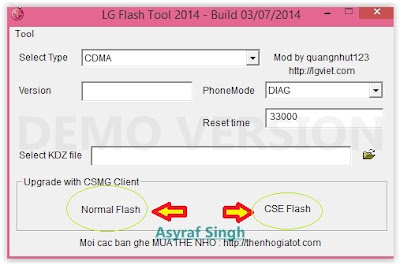
LG flash tool normal flash / CSE flash - Select Type: CDMA
- PhoneMode: DIAG
- Select KDZ file : browse your KDZ file in your drive
- Then you can Click on Normal Flash or CSE Flash (see step 7 to decide this option)
- Then click Start.
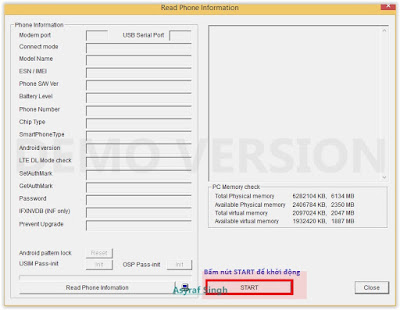
LG flash tool - start - Then click on Clear Phone Software update registry.
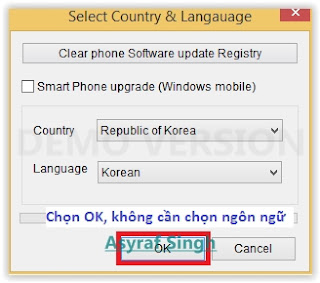
Lg flash tool - Clear Phone Software update registry. - No need to choose desired language, it automatically change to English as a default setting.
- Finally you can click OK.
- You must wait a minute for the LG Mobile Support tool to recognize the LG JOY (LG H221G LEAP WIRELESS) device.
- When you wait this process, may take 5 minute the tool to recognize it.
- The software will start the extraction on your device.
- When the process reach 100% your LG JOY (LG H221G LEAP WIRELESS) will reboot.
- Then, you must Unplug your LG JOY (LG H221G LEAP WIRELESS) from your computer by remove USB Cable from it.,
- Finish,


#2. Guide To Flash LG JOY (LG H221G LEAP WIRELESS)
If #1 method is failed to flash your LG Android device, you can use this second method, flashing LG device using R&D Test Tool
Enter LG JOY (LG H221G LEAP WIRELESS) To Download Mode.
To enter LG LG JOY (LG H221G LEAP WIRELESS) in download mode, you can follow this guide :
- Remove bLEAP WIRELESSerei from your phone
- Plug USB cable to your PC
- Press and Hold volume UP Button, while cable plugs USB Cable from PC to your Phone
- Then will appear white note on your LG JOY (LG H221G LEAP WIRELESS) phone, if you see this you can releasa Volume UP button.
- Press and hold volume UP Button on your LG JOY (LG H221G LEAP WIRELESS) phone again, until you see FIRMWARE UPDATE message.
- If your phone has been detected in your PC (to make sure, click the monitor icon beside Read Phone Information button, this action will open device manager windows. If your phone was detected you can see this at the top)
- Click START, and you will see dialogue box, just click OK
- Wait for the flash process, it will run in approximately 5 minute and your LG JOY (LG H221G LEAP WIRELESS) will restart itself
- Then your LG JOY (LG H221G LEAP WIRELESS) phone will boot up, if you can see Welcome Screen, its mean Flashing process is successfully.
- Unplug USB cable, and finish
- Now your LG JOY (LG H221G LEAP WIRELESS) is installed new firmware.
Saturday, July 23, 2016
Guide How to Hard Reset Factory Reset Android OPPO JOY PLUS
[Guide] How to Hard Reset / Factory Reset Android OPPO JOY PLUS.
Hard Reset OPPO JOY PLUS. On this guide guidebelajar will show you how to Hard Reset / Factory Reset Android OPPO JOY PLUS. Perform Hard reset on android device will wipe or deleted all data stored and App installed on internal phone memory, so you must backup all data before perform it. But data stored on MicroSD will not be affected. If you have set up device with your Google accounts, your contact and and email information is automatically backed up to the Gmail server.
OPPO JOY PLUS is the smartphone released on May, 2015. with 4,0 Inchi wide IPS LCD capacitive touchscreen, 16M colors, work on Android OS, v4.4 (KitKat), and supported with Mediatek MT6572 chipset, Processor Dual-core 1.3 GHz, combined with 1 GB of RAM, 3,15 MP on primary camera and VGA on secondary camera.
Some People say that Hard reset process is call with master reset or factory reset. Many people asking why shoud we perform hard reset to our phone. The logical answer that can I say for this asking is :
- We have forgotten on PIN or Patern Lock at OPPO JOY PLUS.
- Because we will sell our OPPO JOY PLUS Android phones
- There are many bug on OPPO JOY PLUS.
- Restore OPPO JOY PLUS to Default Factory Setting.
- We want to remove all personal data and setting that was stored in OPPO JOY PLUS device.
- OPPO JOY PLUS has a persistent problem that cannot be solved.
- We will give our OPPO JOY PLUS away to some one else, and we dont want that one know everything about our secret data, so we have to erase all data before back up it.
- Our OPPO JOY PLUS has been lagging and stuck on android logo, this call with bootloop.
- and many other reason.
1st Methode. Hard Reset OPPO JOY PLUS Using Software Menu :
- Make sure your batery is fully charged, Recomended you have 80% of battery capacity
- Then Backup your OPPO JOY PLUS . see this guide
- Open the application tray, pointing up located in the middle at the bottom of the display screen
- Go to menu: Setting >
- Select Back Up and Reset>
- Factory Data Reset >
- Reset Phone
- Choose Erase everything to confirm that you already to perform hard reset on OPPO JOY PLUS
- OPPO JOY PLUS will continue to hard reset process to restore factory default.
- You can not use this methode to reset your phone if it lost or stolen.
2ndMethode. Hard Reset OPPO JOY PLUS Using Hardware Keys:
- Make sure your battery is fully charged, we recomended that your battery has 80% power
- Always BackUp your important data that store in OPPO JOY PLUS . see this guide
- Turn Off your OPPO JOY PLUS by hold and press Power Button for a second.
- Release any SIM card and SD card that was installed on your OPPO JOY PLUS smartphone.
- Then press and hold a combination key Power button + Volume Down.

Hard Reset / Factory Reset Android OPPO JOY PLUS - The phone will vibrate and show Oppo Logo on screen, but all button are still pressed.

oppo logo - hard reset oppo JOY PLUS - Now, release All button when your phone show language choice on screen.

Hard Reset OPPO JOY PLUS - You can use volume Down and Volume Up to navigate all menu. and Power Button for confirm your choice. or you can tap menu on screen.
- Now select English to enter ColorOS Recovery.

ColorOS Recovery - Reset Android OPPO JOY PLUS - Then select Wipe Data and cache.

Hard Reset OPPO JOY PLUS - On the next screen select Wipe All Data and Removable Applications.

Wipe All Data and Removable Applications - On the next screen you will show a confirmation about Wipe All Data and Removable Applications, because All Data and Removable Applications will be wiped, this operation can not be undone. And now select OK.

Wipe All Data and Removable Applications - Now, you will see a wipe data and cache process to wipe all data stored on your OPPO JOY PLUS phone.

wiping process hard reset oppo joy plus - Wait untill everything finish,
- If you see a message that wiped data successfully appear o screen, its mean you have successfully perform hard reset on this OPPO JOY PLUS phone.

wiping process hard reset oppo joy plus - Now, select reboot, to reboot your device.

Hard Reset OPPO JOY PLUS. - Select OK to confirm reboot OPPO JOY PLUS .
- Finish, Now you have successfully Hard Reset / Factory Reset Android OPPO JOY PLUS.


Video Guide.
Subscribe to:
Posts (Atom)