Showing posts with label vpn. Show all posts

Tuesday, July 26, 2016

Download TunnelBear apk Free VPN Application

So many of followers of this blog enjoyed 500MB Daily using VPN Master,Today I bring an even better VPN called TunnelBear.TunnelBear is one of the most trusted VPN applications you can rely on in the world. Here, I have contained the download link for the latest version of TunnelBear.apk file which you can download and install straight on your android device.


This version of TunnelBear is free for use however, you may purchase the full version of the app right within the application. The full version of TunnelBear gives you unlimited download with access to any and all common IP addresses in the world.

Meanwhile, the free version of tunnelbear for android only gives you 500mb download volume per month. This means, using the free version of tunnelbear app on your android device, you can browse, upload and download for up to 500mb volume per month.

So, if you are a lite/light VPN user, you may consider downloading the tunnelbear.apk from theDownload Section here and use the free version for as long as you want. In any case, TunnelBear is a nice VPN application and can be trusted.
NOTE: TunnelBear requires you to have a litttel MB on your phone before it connects.Once connected, you can start enjoying it.

Download Section:

Download TunnelBear.apk File From Here 

Get

Read more »

Tuesday, July 19, 2016

Get Free 500MB Daily From MTN Using Master VPN

Master VPN is another VPN application for android devices just like TroidVPN, Tweakware, PSiphon and Simple Server. With Master VPN, you can unlock censored data subscription and browse unlimitedly and anonymously on your android devices. So, if you are looking for a way to browse unlimitedly on your android device using your MTN line, bypass the MTN network settings or access any site that does not accept Nigerian, Master VPN is likely your best guess for android device.
?

Unlike other VPN applications, Master VPN is simple to setup and use. The only flop in this is that it does not work with hotspot although, HTC Android phone users can use USB Tether or Internet Passthrough to make it work with PC.
?

HOW TO USE MASTER VPN FOR MTN NETWORK
1. Make sure that you have an active data on your MTN line. It could be the daily MTN BIS, MTN Free MB or normal subscription.
2. Download Master VPN from here and install it on your android device.
3. On your android device, modify your APN or setup another APN using the settings given below;
APN: web.gprs.mtnnigeria.net
Password: gprs
Username: web
Proxy: 127.0.0.1
Port: 8080
4. Now, enable Data Connect on your android device.
5. Lunch Master VPN application on your android device and Click "GO". Wait about 5 seconds for Master VPN to initiate and connect the phone to the internet. Once connected, you may begin browsing the internet and downloading as you wish.
6. Select the Apps you wish to connect through Master VPN by swapping up until you see the "+" in the circle. Tap it and add all your apps by marking them.
?

NOTE:
Remember to always add newly installed apps to the list by following the same procedure as given above.

WHY USE MASTER VPN FOR UNLIMITED BROWSING USING MTN NETWORK SIM?
1. Master VPN is FREE
2. Master VPN is faster for browsing with MTN BIS, MTN Free MB, MTN normal data plan than most other VPN apps I have used.
3. Master VPN does not require root access at all.
4. Master VPN starts automatically. Meaning, once your phone is on, Master VPN ons with it.

NOTE:
Master VPN requires root access to work with any android devices with android version below 4.2.

Do you like this? Have Issues connecting?  Add your Comment  below. Remember to share with your friends!


?

Get

Read more »

Monday, July 18, 2016

How to Share VPN Network from Mobile to PC Using DF Tethering Fix App

  Hi there! Today I will show you guys how to VPN from Mobile to PC  Network using DF Tethering Fix App.It is another  another super-fast tethering app that works perfect without any limitation,

DF Tethering Fix allows you to remove limitation on tethering imposed by android and let you use your mobile Vpn networks such as Psiphon, OpenVpn, Tweakware etc. You can share the network using your mobile hotspot.


Advantage of DF Tethering Fix app
1. You dont need to install any apps on the device you want to share the network to
2. It has no limitation

Note: This app works on rooted device only not like pdanet+. To enjoy this app you need to root your mobile device.
If you want to root your android device click HERE

How it Works.

Click HERE to download DF Tethering Fix app on your android device

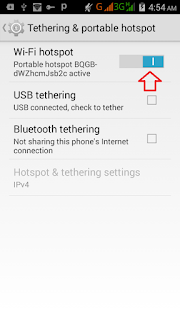
Now go to your Mobile settings, under Tethering and portable hotspots turn your Wi-Fi hotspot ON

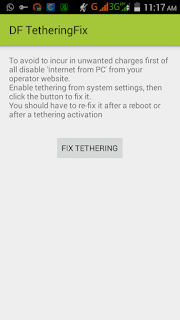
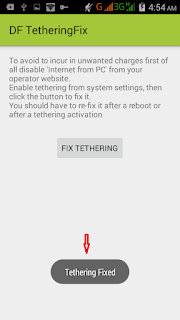
Then lunch the DF Tethering app on your phone


Click on FIX TETHERING until Tethering Fixed show up


Now go to your pc and turn on you Wi-Fi and search for the network and click your pc with it

Note: Make sure your vpn software is connected

Thats all

Enjoy.

Get

Read more »