Showing posts with label app. Show all posts
Showing posts with label app. Show all posts
Sunday, July 24, 2016
Best Way to Run Android App on PC
Great News guys! You can run and play any android app on your pc, no need of android smartphone, with bluestacks you can chat, play game and even download apps from playstore using your pc.
BlueStacks is currently the best way to run Android apps on Windows. It doesn’t replace your entire operating system. Instead, it runs Android apps within a window on your Windows desktop. This allows you to use Android apps just like any other program. BlueStacks also includes support for easy installation of apps from Google Play.
BlueStacks is currently the best way to run Android apps on Windows. It doesn’t replace your entire operating system. Instead, it runs Android apps within a window on your Windows desktop. This allows you to use Android apps just like any other program. BlueStacks also includes support for easy installation of apps from Google Play.
What you can do with bluestacks app
1.Run WhatsApp Messenger, Facebook app and other social media apps
2. Download and Install apps from Playstore
3.Play Android Games e.t.c
Where To Get the app
Click HERE to download Bluestacks for free
How To Install Bluestacks app
Click the download setup to install it


After successful downloading it will start initializing

Congratulation your bluestacks app is now ready to run Android app on pc

You can add your google account on it

You can download and install your favorite android apps and run then

You can Play your favorite games

Run Whatsapp messenger and chat with your friends

You can now enjoy Android apps on pc without your smartphone

Blog My Tuts RSS Reader Android App
Most of the readers of this blog are fairly tech savvy, so will probably already know what RSS is. It stands for Really Simple Syndication. It is a way for people to subscribe to the exact content they want from your (and other) sites by pulling it from an XML file on your site into a reader (such as Bloglines).
The internet is overloaded with content. Even if you only set out to read the most important articles and watch the top videos, youll never get done.
Just staying up-to-date and informed is a challenge. You have news to read, blogs to check, and YouTube hits youve got to watch. But instead of opening each site a half-dozen times a day, you can use an RSS app to curate your content automatically.
Theres two main types of RSS readers: online RSS services, and native RSS apps. The former run automatically in the background, finding new articles as soon as theyre published. You can read articles online, or typically sync them with apps for your phone or computer—either made by the RSS service, or from third-party developers.

BMT RSS Reader is a native RSS apps for Android you can get the latest post form blogmytuts.net , plus Android Central, Symbianize, and Engadget.
Within the post instant share, translate, copy link, and change theme/text size.

Feature! You can Add custom Podcast, weblinks or RSS on the Explorer Menu. Now you have 1 app Reader to all.

App Permision :

The internet is overloaded with content. Even if you only set out to read the most important articles and watch the top videos, youll never get done.
Just staying up-to-date and informed is a challenge. You have news to read, blogs to check, and YouTube hits youve got to watch. But instead of opening each site a half-dozen times a day, you can use an RSS app to curate your content automatically.
Theres two main types of RSS readers: online RSS services, and native RSS apps. The former run automatically in the background, finding new articles as soon as theyre published. You can read articles online, or typically sync them with apps for your phone or computer—either made by the RSS service, or from third-party developers.
BMT RSS Reader is a native RSS apps for Android you can get the latest post form blogmytuts.net , plus Android Central, Symbianize, and Engadget.
Within the post instant share, translate, copy link, and change theme/text size.
Feature! You can Add custom Podcast, weblinks or RSS on the Explorer Menu. Now you have 1 app Reader to all.
App Permision :
Ver 1.0 File Size 10MB
DOWNLOAD
Google Drive

Google Drive
Friday, July 22, 2016
First Sony Xperia S software update now available through PC Companion app
News
Smartphones

If you were one of the lucky few able to grab an Sony Xperia S in Barcelona during MWC, today youll be able to pick up a new software update to version 6.0.A.3.67. The update isnt yet going out over the air, but it is available through Sonys PC Companion app for Windows.
Unfortunately the package doesnt include the sorely-needed Android 4.0 Ice Cream Sandwich update -- thats due sometime during the second quarter. However, were hoping the update fixes a few niggling issues weve been noticing with our review unit, including some radio wonkiness and difficulty automatically disconnecting from Wifi routers when out of range. If youve picked up the new software on your Xperia S, be sure to point out any changes or fixes over in the comments.
For more on the Xperia S, check out our initial review and hands-on video.
Monday, July 18, 2016
How to Share VPN Network from Mobile to PC Using DF Tethering Fix App
Hi there! Today I will show you guys how to VPN from Mobile to PC Network using DF Tethering Fix App.It is another another super-fast tethering app that works perfect without any limitation,
DF Tethering Fix allows you to remove limitation on tethering imposed by android and let you use your mobile Vpn networks such as Psiphon, OpenVpn, Tweakware etc. You can share the network using your mobile hotspot.
Advantage of DF Tethering Fix app
1. You dont need to install any apps on the device you want to share the network to
2. It has no limitation
Note: This app works on rooted device only not like pdanet+. To enjoy this app you need to root your mobile device.
If you want to root your android device click HERE
How it Works.
Click HERE to download DF Tethering Fix app on your android device
Now go to your Mobile settings, under Tethering and portable hotspots turn your Wi-Fi hotspot ON
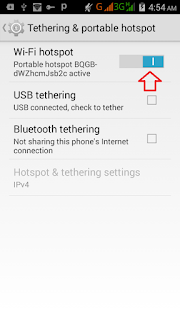
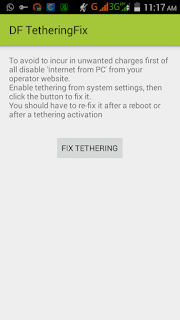
Click on FIX TETHERING until Tethering Fixed show up
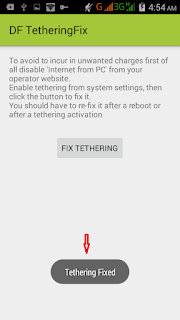
Now go to your pc and turn on you Wi-Fi and search for the network and click your pc with it
Note: Make sure your vpn software is connected
Thats all
Enjoy.
EZChannel App is Available on Google Play

EZChannel is the best way to search the internets most popular videos, across multiple popular video sites including YouTube, Dailymotion, Vimeo, Youku, facebook, and etc. Watch recommended channel list to discover world class popular content and creators. Watch EZChannel video on big TV screen by using EZCast 5G Dongle, Chromecast, or Apple TV streaming devices.
Features
• FREE of charge: Enjoy life time video for FREE
• All-in-One: Search across multiple video sites, including YouTube, Dailymotion, Vimeo and so on.
• Watch on TV: Cast to EZCast 5G Dongle, Apple TV, and Chromecast.
• Live Streaming: Support live TV, News, Radio and Twitch.
• High quality video: Retrieve the best quality video for your device automatically.
• EZChannel Home: Personalized content recommendations.
• Floating Player: Discover more while watching video.
• Smart Channel: Create personal channel automatically by keywords.
• Non-stop Playback: Playing next video automatically
• FREE of charge: Enjoy life time video for FREE
• All-in-One: Search across multiple video sites, including YouTube, Dailymotion, Vimeo and so on.
• Watch on TV: Cast to EZCast 5G Dongle, Apple TV, and Chromecast.
• Live Streaming: Support live TV, News, Radio and Twitch.
• High quality video: Retrieve the best quality video for your device automatically.
• EZChannel Home: Personalized content recommendations.
• Floating Player: Discover more while watching video.
• Smart Channel: Create personal channel automatically by keywords.
• Non-stop Playback: Playing next video automatically
Have fun!
Everything you want to know about EZCast youll find here.
DISCLAIMER. Videos will stream from 3rd party CDNs (such as YouTube, Dailymotion, etc.) instead of EZChannel servers. Please use UGC apps (such as YouTube, Dailymotion, etc.) for video upload.
Don’t miss any of our future video tutorials, follow us on Youtube. Like us on Facebook. Add us in your circles on Google+. Watch our photo albums on Flickr. Subscribe now to our newsletter. Biggest firmware download center.
Sunday, July 17, 2016
Browse the Web with MTN Free 150MB Using Psiphon App
Hey guys, earlier on this blog we discussed on how to use MTN MusicPlus 150MB with Android Simple server but so few people sent me a message that it didnt work for them. Here, I will show you how to use this Free MB with Psiphon App. This method has been tested by me and it is confirmed working.
To get this Free 150MB, send I to 5900.
Downloads:
Search Google and Download Psiphon Handler
Configurations:Configure your Psiphon Handler as follows
Proxy Type: HTTP
Custom Header: X-online-Host
Proxy server: http://musicplus.mtnonline.com
Proxy type: Default
Real proxy server: musicplus.mtnonline.com
Real proxy port: 8080
Click on SAVE. After that, the App will ask you whether to Psiphon Browser only or Tunnel whole device, Simple click on "Tunnel whole device"
Thats all..You can now click on "START" to start connection. After successful connection, minimize Psiphon and start browsing.
Enjoy it while it lasts and dont forget to make your comments below and also share this post with your friends.
To get this Free 150MB, send I to 5900.
Downloads:
Search Google and Download Psiphon Handler
Configurations:Configure your Psiphon Handler as follows
Proxy Type: HTTP
Custom Header: X-online-Host
Proxy server: http://musicplus.mtnonline.com
Proxy type: Default
Real proxy server: musicplus.mtnonline.com
Real proxy port: 8080
Click on SAVE. After that, the App will ask you whether to Psiphon Browser only or Tunnel whole device, Simple click on "Tunnel whole device"
Thats all..You can now click on "START" to start connection. After successful connection, minimize Psiphon and start browsing.
Enjoy it while it lasts and dont forget to make your comments below and also share this post with your friends.
Subscribe to:
Posts (Atom)