Thursday, July 28, 2016
How to Install Android 6 0 1 Marshmallow ResurrectionRemix MM 5 6 9 ROM on Asus Zenfone 5 A500CG T00F J
The ASUS Zenfone 5 is the middle child of ASUS’ low cost line of smartphones but for being a budget phone it comes packed with some very respectable hardware and specifications. The design is very simplistic with rounded corners, flat sides, and a curved back with a matte finish allowing the phone to sit very comfortably in the hand. It’s made entirely of plastic with the exception of the metal band along the bottom chin to give the phone a slightly more premium look.

If you are looking to install a new custom ROM then we have here as usual the best Custom ROMs for your Asus Zenfone 5.
According to XDA member tank0412, Android 6.0.1 Marshmallow ResurrectionRemix MM 5.6.9 ROM is now available for Asus Zenfone 5 A500CG [ T00F/J]
÷ Rom Features:
Based On Latest Google Android 6.0.1 Release
Based On Cyanogenmod 13 Sources
RR Customizations:-
-Navigation Bar
-Enable/Disable Navbar
-Navbar Button Customization
-Navbar Slim Dim
-Animate Dim
-Dim Timeout Duration
-Dim Alpha
-Double Tap To sleep navbar
-Navigation Bar left/Right handed mode Switch for landscape
÷ What NOT working:
GPS && FM
÷ NOTE:
This rom marked as nightly but it does not mean that it is unstable and etc.
It mean that i add something every day. Nothing else.
÷ Prerequisites:
•This tutorial is only for installing Android 6.0.1 Marshmallow ResurrectionRemix MM 5.6.9 ROM on Asus Zenfone 5 A500CG [ T00F/J]. Please do not try on any other Asus Zenfone 5 variants.
•Your phone should be rooted and haveClockworkMod recovery installed from before.
•This tutorial will wipe out all your data.Proceed at your own risk.Perform a Dalvik Cache wipe before proceeding from the recovery mode.
•Make sure you backup all your data in your phone before proceeding.
*Disclaimer:
Android Custom ROM fix ® provide various Firmware Updates and Rooting process along with Custom ROM,Modes,file are all belong to their owners/developers. The autor of this site or the developers are not responsible, if you damage or brick your device.Do it on your own risk and follow the instruction properly.
* Important:
Backup important files stored on your device before proceeding with the steps below, so that in case something goes wrong you’ll have backup of all your important files.
ROM Download & Installation Instructions via XDA.

For More Asus Zenfone 5 latest updates Keep Checking Android Custom ROM Fix ™®
That’s all. We hope this guide serves you well. If there’s anything you’d like to be added/changed on this page, PLZ Use the comment box below to contribute more ideas & Suggestions .
Like this post? PLZ Hit the share buttons below to share this article with your friends on Facebook, Google + and Twitter.
PLZ Follow Us On Flipboard 4 More Latest Updates.
Best Regards.™

Tuesday, July 26, 2016
ASUS ZenFone 3 Teaser


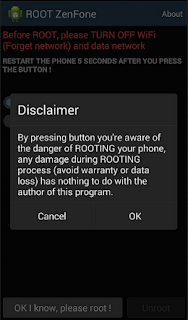
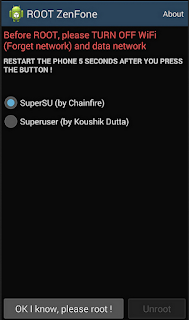
How To Root Asus Zenfone 4 Without PC
Sunday, July 24, 2016
Guide How to Enter Droitboot or Fastboot and Recovery Mode on Asus Zenfone Lollipop
[Guide] How to Enter Droitboot or Fastboot and Recovery Mode on Asus Zenfone Lollipop.
Method #1. Enter Droidboot on Asus Zenfone.
- Make sure your Asus Zenfone is turn off.
- Make sure your battery is fully charged, or minimum has 50% of battery power.
- Now, Turn On Asus Zenfone by press and hold Power Button and Volume UP.
- Release only Power Button when you see Asus Logo appear on screen. While Volume Up button still holded until your Asus Zenfone enter droidboot.

How to Enter Droitboot or Fastboot - After a few seconds your Asus Zenfone will enter Droidboot.

How to Enter Droitboot or Fastboot - Now, your position is on droidboot menu.
- Use Volume UP and Volume Down to select menu.
- Use Power Button to confirm your selection


Method #2. Enter Droidboot on Asus Zenfone. (active device)
- You must prepare this tool.
- ADB Tool -> Download and extract it on your computer folder.
- Intel USB Driver -> Download and install it.
- Recovery.img -> you can download from support.asus.com
- Enable Developer Options.
- Settings
- About
- Build Numbers (tap it 7 times)
- Enable USB Debugging
- Connect your Asus Zenfone to the PC using USB cable.
- Now, open your ADB file on your computer folder.
- Open a command prompt from within your ADB/fastboot folder.
- To start this command prompt just hold shift + right click, select open command prompt here.
- Then on the command prompt window type : adb device and press enter

- If you see successfully message, Now check your Asus Zenfone there you will see Pop Ups menu appear on screen.
- Select Allow.
- Now back to the ADB command prompt then type : adb reboot-bootloader and press enter
- Now your Asus Zenfone device will reboot automatically, then enter droidboot.

Enter Recovery Mode on Asus Zenfone.
- Once you entering droidboot menu, now you can select recovery menu.

recovery mode asus zenfone lollipop - To select menu on Droidboot you can use volume down / volume up.
- To confirm your selection use Power button.
- Once you select recovery Mode, your Asus Zenfone will reboot.
- After reboot your Asus Zenfone turn on again, and now you can see Android logo and No command on screen.

no command asus zenfone lollipop - Now, press and hold power button and volume up button.
- Then release volume up button only,
- Now, you will enter Recovery Mode.

recovery mode asus zenfone lollipop - Finish.


What can you do in Recovery Mode ?
- Reboot system Now -> this menu will reboot your system, you can use it for Softbrick
- Apply Update From ADB. -> this menu used for flashing firmware or system via adb slideload.
- Wipe data/ Factory Reset -> This menu will return your device to factory setting.
- Cleasr Cache Partition. -> this menu will erase cache on partiton.
- Reboot to bootloader. -> this menu will reboot your zenfone into bootloader.
- Power Down. -> this menu will shut down asus zenfone.
- View Recovery Logs. -> This menu will show you system recovery logs.
Video Guide.
How to Unlock Bootloader ZenFone 2 Laser ZE500KL Android M

What you Need :
- ADB Fastboot (Download)
- Twrp 2.8.7.7.img (Download)
- UnlockBL.zip (Download)
- LockBL.zip if you want to re-lock bootloader (Download)
How to Unlock Bootloader ZenFone 2 Laser ZE500KL Marshmallow:
- Download and install ADB Fastboot
- Download Twrp.img and unlockBL.zip above
- Copy and Paste UnlockBL.zip to Zenfone 2laser memory
- Enter fastboot mode by turn off zenfone and press power+volume up
- At Twrp 2.8.7.7.img folder open cmd by pressing shift+right click > open command here
- Type at cmd: fastboot boot twrp_2.8.7.7.img
- Flash UnlockBL.zip via twrp recovery
- Reboot
- Done
How to Root ASUS ZenFone 2 Laser ZE500KL Marshmallow

How to Root ASUS ZenFone 2 Laser ZE500KL (Android Marshmallow):
- Install TWRP Recovery (Tutorial)
- Download Patched boot boot_13.10.6.16_patch.img (Download)
- Enter fastboot by turn off device and press power+volume up
- Open cmd and type: fastboot boot boot_13.10.6.16_patch.img
- Download SuperSU.zip (Download) and copy to SD card
- Enter TWRP recovery and flash superSU.zip via recovery
How to Update Asus ZenFone Max ZC550KL to Android 6 0 1 Marshmallow Beta OTA V13 8 26 15

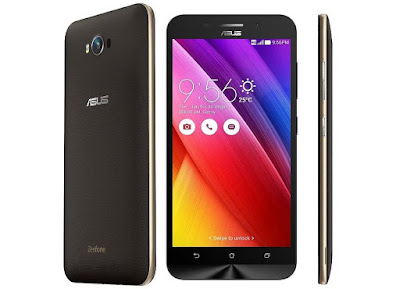
Now follow the guide to Download & Install Asus ZenFone Max ZC550KL Android 6.0.1 Marshmallow Beta Update.
The Update comes with loads of extra features.You will also get the DOZE Mode resulting in good battery life.This update comes with loads of bug fixes.It comes with Build number V13.8.26.15 and the File Size: Up to 1.1GB.
Before you begin the flashing process, first download Asus USB drivers on your computer, then enable USB debugging on your smartphone, go to settings >>developers option. If developer’s option isn’t visible on your galaxy device, simply go to about phoneunder settings and scroll down to build number, then tap build numberup to 7 times to make developers option visible.
÷ Prerequisites:
•This tutorial is only for installing Android 6.0.1 Marshmallow Beta OTA V13.8.26.15 on Asus ZenFone Max ZC550KL. Please do not try on any other Asus ZenFone variants.
•Make sure there is at least 80% battery left on your smartphone before begin…
*Disclaimer:
Android Custom ROM fix ® provide various Firmware Updates and Rooting process along with Custom ROM,Modes,file are all belong to their owners/developers. The autor of this site or the developers are not responsible, if you damage or brick your device.Do it on your own risk and follow the instruction properly.
* Important:
Backup important files stored on your device before proceeding with the steps below, so that in case something goes wrong you’ll have backup of all your important files.
÷ How to Update Asus ZenFone Max ZC550KL to Android 6.0.1 Marshmallow Beta OTA V13.8.26.15.
1- DownloadAAsus ZenFone Max ZC550KL to Android 6.0.1 Marshmallow Beta OTA V13.8.26.15.
2- Setup ADB & fast boot On Your Computer.Guide > Quickest Way To Install Android ADB and Fastboot (with drivers) on Windows .
3- Connect your device to Computer and Trust the connection by checking “Always allow from this computer”
4- Put the downloaded OTA Firmware file inside the Fastboot folder
5- Now open the command window from the ADB & Fastboot folder.hold the shift key on the keyboard and right-click on an empty space and select “Open command window here” option to launch a cmd window
6- Then boot your device into bootloader mode by issuing the following command
adb reboot bootloader
7- Now issue the following command to check ADB Connection
adb devices
8- Then go to Marshmallow beta ROM folder & open the S3V3N_cmd file.The command prompt will pop up.then issue the following command to Install the OTA Update Firmware file
flashall_AFT WW_ZC550KL_V 13.8.26.15 _M3.1.39_Phone-user.raw
9- Once the installation is completed, reboot your device by running below command
fastboot reboot.
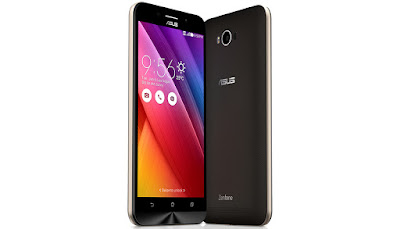
That’s it! Your Asus ZenFone Max ZC550KL now have Android 6.0.1 Marshmallow Beta OTA V13.8.26.15 installed on your phone! Go to Settings > About phone to verify.
Like this post? PLZ Hit the share buttons below to share this article with your friends on Facebook, Google + and Twitter.
PLZ Follow Us On Flipboard 4 More Asus ZenFone Latest Updates.
PLZ Use the comment box below to contribute more ideas & Suggestions .
Best Regards.
Thursday, July 21, 2016
How to Update Asus Zenfone 5 A501CG to Android 6 0 1 Marshmallow XOSP 6 1 ROM
If you are looking to install a new custom ROM for Zenfone 5 A501CG then we have here as usual the best Custom ROMs for you.
According to XDA member resk87, Android 6.0.1 Marshmallow XOSP 6.1 ROM is available now for your Asus Zenfone 5 A501CG.

÷ ROM Features:
Based on CM 13.0
Removed many unnecessary apps and stuff as well as CM ones
StatusBar Clock font style
StatusBar Clock font size
Added StatusBar Date & style options
Added option for date style/position, left-right of clock
Xperia Z5 inspired LockScreen style
Xperia Fonts
Xperia Battery Text prototype
Time Contextual Headers
XOSP Universal dialog for Shutdown/Reboot and Dexopting Process
XOSPOTA
Stock Kernel
Snap Camera
ViPER Audio Engine
Theme Chooser
Xperia based Bootanimation
Custom Framework and SystemUI Xperia drawables
XOSPFileManager
Xperia Z5 sounds
Xperia X Wallpapers
XOSPSetupWizard
Custom Materialized
Stock Browser is custom themed
Contacts is custom themed (Much more Xperia Style)

Dialer is custom themed (Much more Xperia Style)
Status bar logo
Navigation Bar ON/OFF
NavBar dimensions
SlimDim
HW Keys ON/OFF
SlimSeek Bar
Status bar Network Traffic indicator
RAM Bar in recents options
Toast Animations
Long Press back to kill in Development Settings
Ability to hide the Super SU status bar icon
Dashboard Columns
Dashboard double lines toggle
Double Tap to sleep anywhere on the lockscreen
On-the-go Mode
Double tap to sleep on navigation bar
SystemApp remover
Omni inbuilt SystemUI Screen recording
SuperSU
Xperia Apps
Xperia Z5 Home app
Album App
PhotoEditor
PhotoAnalyzer
Xperia Keyboard (aka textinput-tng)
Music (former WALKMAN)
Video
SemCalendar
AudioRecorder (Material Version)
ClockWidgets
Sketch
SmartConnect
WallpaperPicker (For Xperia X custom wallpapers)
Weather App
Wheater Widget
Walkman Widget
Track ID
SomcPodcast
SemcDLNA
÷ Bugs:
GPS
FM.
÷ Prerequisites:
•This tutorial is only for installing Android 6.0.1 Marshmallow XOSP 6.1 ROM on Asus Zenfone 5 A501CG. Please do not try on any other Asus Zenfone 5 variants.
•Your phone should be rooted and haveClockworkMod recovery installed from before.
•This tutorial will wipe out all your data.Proceed at your own risk.Perform a Dalvik Cache wipe before proceeding from the recovery mode.
Make sure you backup all your data in your phone before proceeding.
*Disclaimer:
Android Custom ROM fix ® provide various Firmware Updates and Rooting process along with Custom ROM,Modes,file are all belong to their owners/developers. The autor of this site or the developers are not responsible, if you damage or brick your device.Do it on your own risk and follow the instruction properly.
* Important:
Backup important files stored on your device before proceeding with the steps below, so that in case something goes wrong you’ll have backup of all your important files.
ROM Download & Installation Instructions via XDA.

For More Asus Zenfone 5 A501CG. updates Keep Checking Android Custom ROM Fix™®
Like this post? PLZ Hit the share buttons below to share this article with your friends on Facebook, Google + and Twitter.
PLZ Follow Us On Flipboard 4 More Latest Updates.
PLZ Use the comment box below to contribute more ideas & Suggestions .
Best Regards.
Bootloader Resmi Untuk Zenfone 2 Sudah Tersdia
Satu hal yang tidak lepas dari Sistem Operasi Android adalah modifikasi, Android adalah sistem operasi open source sehingga bisa memungkinkan penggunanya mengcustom smartphone mereka,Tetapi tidak semua handset android dengan mudah bisa dimodifikasi ada keterbatasan yang dimiliki handset pada masing-masing produsen yang telah merilisnya.
Kabar baik mendatangi para pengguna asus Zenfone 2, pasalnya pihak perusahaan telah merilis bootloader untuk handset ini, Dengan disediakannya aplikasi tersebut, pengguna diberikan kebebasan untuk mengoprek Android dan menginstalasi custom ROM di smartphone populer Asus ini.
Jika anda ingin menggunakan bootloader ini ada beberapa hal yang harus diperhatikan,
Proses bootloader sangat beresiko dan software perangkat tidak bisa dikembalikan ke versi locked seperti semula lagi. Selain itu, garansi tidak akan berlaku lagi. Hal yang penting ketika pengguna sudah menggunakan custom ROM di ZenFone 2, maka tidak akan mendapatkan update software lagi dari Asus. Resiko ketika smartphone melakukan instalasi juga bisa mengakibatkan nge-brick atau smartphone tidak mau masuk ke sistem.
Jika anda ingin menggunakan fitur baru ini sebaiknya mempertimbangkan resiko yang akan terjadi pastikan terlebih dulu, ZenFone 2 ada di firmware versi 2.20.40.59 atau lebih baru. Setelah itu, jalankan aplikasi bootloader tersebut, sama seperti menginstalasi aplikasi pada umumnya.

Guide How to Unlock and Relock Bootloader on Asus Zenfone 2 ZE500CL
[Guide] How to Unlock and Relock Bootloader on Asus Zenfone 2 ZE500CL.
Prerequisite.
- Download the Unofficial Unlock Bootloader tool here.
- Extract and copy all file to the SD Card.
Guide to Unlock Bootloader Asus Zenfone.
- Makse sure your Asus Zenfone battery is fully charged, or at least has 75% of battery capacity.
- Now enter Droidboot. see this guide how to enter droidboot.
- Once you enter droidboot now run the bat file Unlock.bat. -> to unlock bootloader
- Or, run Relock.bat -> to relock bootloader.
- Wait the process untill finish
- Good luck
Tuesday, July 19, 2016
How to Install Android 6 0 1 Marshmallow on AOKP ROM on Asus Zenfone 6 All Variants
Android 6.0.1 Marshmallow AOKP ROM is now available for Asus Zenfone 6 A500CG (T00F)/

÷ Bugs:


Download Android Lollipop 5 0 stock firmware for Asus Zenfone Max smartphone

Firmware details
Archive: Zenfone Max Snapdragon MSM8916 Android 5.0 Smartphone Firmware 202635 160514
Image: Zenfone Max Snapdragon MSM8916 Android 5.0 Smartphone Firmware 202635 160514
Firmware: Android Lollipop 5.0 stock
Image file size: 0.98 GB
Inside archive: firmware + Volume+ and Power Button To Read Devices.bat + scripts.bat + Flash.bat + fastboot.exe